
What Is Digital Delivery and How It Works
Digital delivery is the electronic transfer of a document or service to a verified recipient. For a traveler, that can mean receiving a certified driving licence translation PDF in minutes, ready to show at a rental counter or checkpoint.
You're standing abroad with your passport, payment card, and original driving licence. The rental agent looks at the licence, pauses, and turns it toward a colleague. The details are printed in a script neither of them can easily read. Your reservation is waiting, the queue is growing, and a physical translation sitting at home won't help.
A digitally delivered translation companion can give the agent a readable version of the licence without waiting for postal delivery. But speed alone doesn't make a document acceptable. The recipient, issuing provider, file structure, verification method, and local rules all matter. Understanding what is digital delivery means understanding both the convenient download and the trust system behind it.
Table of Contents
- The Moment You Need a Document You Can Read
- A Plain-Language Definition of Digital Delivery
- Why Speed, Security, and Accessibility Matter for Travelers
- Digital vs Physical Delivery Side by Side
- How QR-Based Verification Works in Practice
- Why Licence Translations Fit the Digital Model
- Where Digital Ends and Official IDPs Begin
- A Simple Trust Checklist Before You Rely on a Digital Document
The Moment You Need a Document You Can Read
At a foreign rental desk, you place your driving licence on the counter. The card proves who you are and what you may drive, yet its unfamiliar words, abbreviations, or characters can slow the agent's check. They need to read your name, licence categories, dates, and restrictions before handing over the keys.

A translation companion solves the reading problem by sitting beside the original physical licence. It presents the licence information in a language or script the receiving person can understand. The original remains the document you hold. The companion is not automatically a replacement for it or an official international permit. Its role is practical: help the agent read and check the licence already in your possession.
The counter-side sequence
The process at the desk usually looks like this:
- The original licence is presented. The agent checks that the card belongs to the renter and contains the required driving information.
- The translated companion is opened. You display a PDF on your phone or provide a printed copy.
- The details are compared. Names, licence numbers, categories, and dates should correspond with the original card.
- The document is checked. A QR code or verification portal may let the agent confirm where the document came from.
The file arriving through an inbox or secure dashboard is the traveler's visible experience of digital delivery. At the desk, that means a document can reach you without waiting for paper delivery and can be shown on the device you already carry.
The file should also remain checkable. A readable translation helps the agent understand the licence, while matching details and a verification feature help connect that translation to its source. If a border officer or rental agent questions the document, the original licence and its companion can be reviewed together rather than treated as unrelated papers.
The key moment is simple: your licence is valid for you, but its meaning must also be accessible to the person checking it. A digitally delivered translation companion supports that conversation without changing what the original licence is.
A Plain-Language Definition of Digital Delivery
At the rental counter, digital delivery means the document reaches the right traveler in a file that can be opened, understood, and checked. Digital delivery is the electronic transfer of a document or service to an identified or verified recipient in a format that can be opened, used, and checked digitally. The result may be a PDF in an email, a download from a secure dashboard, a link, or a record inside an app.
For a traveler holding a licence from another country, the practical example is a certified translation companion. The provider prepares the file, associates it with the customer who requested it, and makes it available through a digital channel. At the desk, the traveler opens it on a phone or presents a printed copy. The agent can read the translated fields and use an available verification feature to review the document's origin.
The file's structure also matters. A digital document is more useful than a photograph of paper when its information is arranged for software to interpret.
A machine-readable file contains data that a computer can search, compare, validate, or pass into another controlled workflow. Transportation agencies describe digital delivery as a move from static documents toward reusable models and files, which can reduce manual extraction and rekeying in later processes. The North Carolina Department of Transportation material on digital delivery shows the distinction between information prepared for computer systems and a document intended only for human viewing.
Four parts of a trustworthy digital handoff
Use four questions to understand the handoff:
- What is being delivered? Here, it is the translated licence information.
- How does it arrive? The channel may be email, a secure account, an app, or a download link.
- Who receives it? The provider connects the file with the customer who requested access.
- How can another person check it? A signature, QR code, reference number, or issuer-controlled record can help assess authenticity.
Encryption protects information while it travels or remains stored. Authentication checks who is requesting or receiving access. A verification token, such as a QR code, links the visible document to a separate record or checking process.
Digital delivery therefore combines electronic access, structured information, controlled distribution, and verifiability. At the counter, those features let an agent inspect a readable licence companion and assess its connection to the source, without waiting for a courier or relying only on an unfamiliar paper stamp.
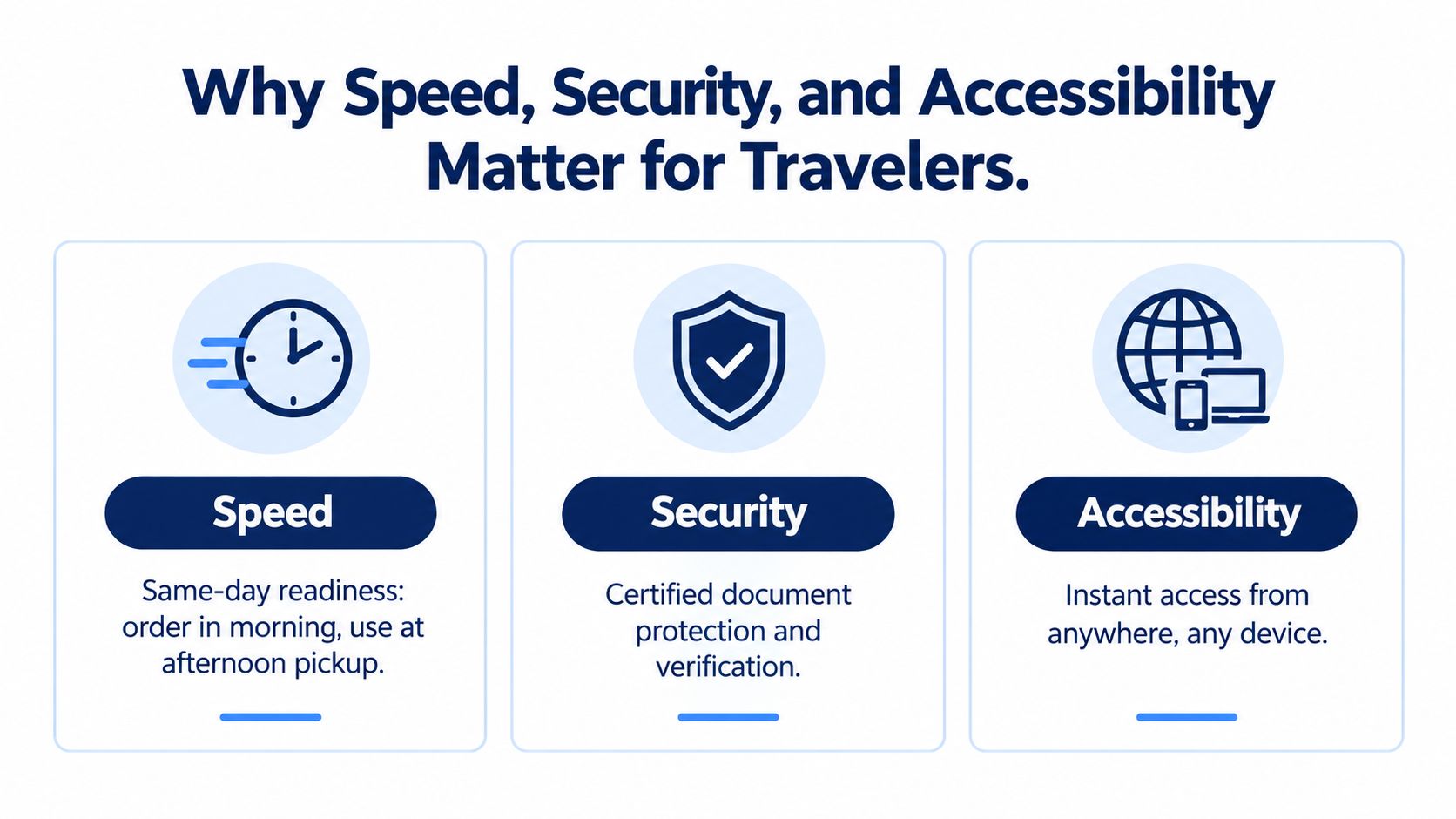
Why Speed, Security, and Accessibility Matter for Travelers
Travel documents are often needed at a fixed moment, not whenever the postal service happens to arrive. A booking can change, a flight can be delayed, or a traveler can decide to rent a car after reaching a new destination. Digital delivery helps because the document can be prepared and accessed close to the point of use.
Speed creates readiness
Suppose you realize at breakfast that the rental desk expects a readable translation. A digital workflow can make the file available before the afternoon pickup, provided the provider's review process and the destination's acceptance rules allow it. The advantage isn't just comfort. It reduces the gap between discovering a requirement and being able to respond to it.
Consumers' delivery expectations are also becoming more flexible. A 2026 DHL report says 20% of consumers identify faster delivery as a purchase motivator, while 30% look for out-of-home delivery options. The DHL delivery-trends discussion places those expectations within a wider shift toward connected, responsive delivery systems.
Security protects the handoff
A document sent digitally should give the recipient more than a convenient file. It should protect personal information during transfer, limit access to the intended customer, and provide a way to detect changes or confirm the issuer.
A controlled PDF can carry a digital signature or verification reference. A QR code can lead the agent to an issuer-controlled page instead of asking the agent to trust an isolated attachment. The authentication web API guide shows why connected verification systems are useful when a document must move between people and services.
Accessibility keeps the document with you
A phone can travel from the airport to the rental desk, across a border, and into a roadside inspection. That makes digital access useful when a printed copy is damaged, misplaced, or left in a hotel room. It also supports travelers whose itinerary changes after departure.
Practical rule: Keep the original licence available, save the digital file for offline access, and know how the receiving agent can verify it before you reach the counter.
These benefits don't remove local judgment. An agent may still need the physical licence, an official permit, or another document required by local law. Digital delivery improves readiness and traceability, but it can't override an authority's acceptance rules.
Digital vs Physical Delivery Side by Side
Digital and physical delivery solve related problems through different channels. At a rental desk, a digital translation may be waiting in your inbox before you land, while a printed booklet may be waiting at a hotel or delivered separately. Neither format is universally sufficient, because the receiving authority decides what it will accept.
| Criteria | Digital Delivery | Physical Delivery |
|---|---|---|
| Cost | May avoid printing and shipping charges, depending on the provider | Includes printing, packaging, and courier handling |
| Delivery time | Can be accessed as soon as the provider releases the file | Depends on production, dispatch, and delivery schedules |
| Verification method | Can use a QR code, digital signature, portal, or reference record | May rely on stamps, seals, paper security features, or manual calls |
| Reprint flexibility | Can often be downloaded again or displayed on another device | Requires another physical copy or careful preservation |
| Storage footprint | Stored on a phone, secure account, or backup drive | Occupies physical space and can be lost or damaged |
| Environmental impact | Avoids the physical materials and transport of a paper shipment | Requires materials and delivery movement |
The difference is most visible when plans change. If you add a rental after arriving, digital access can respond to the timing of that decision. If your phone battery fails or the checkpoint has no practical way to scan a file, a printed document may be easier to handle.
When paper still matters
Some government offices, border points, rental businesses, and police services may require an original physical document or may not have the equipment, connectivity, or policy needed to check a digital record. A paper booklet can also be useful as a backup when the traveler wants something an agent can hold and inspect without relying on a screen.
The strongest approach is often not digital instead of physical. It's choosing the format that matches the requirement, then keeping the original licence and any legally required permit with you. A translated PDF can improve access and speed, while a printed companion can add resilience during a long journey.
How QR-Based Verification Works in Practice
A QR code is useful only when it connects to a trustworthy verification process. The square pattern itself doesn't prove that every word in a PDF is accurate. It gives the agent a fast route to information maintained by the issuing provider or its verification system.
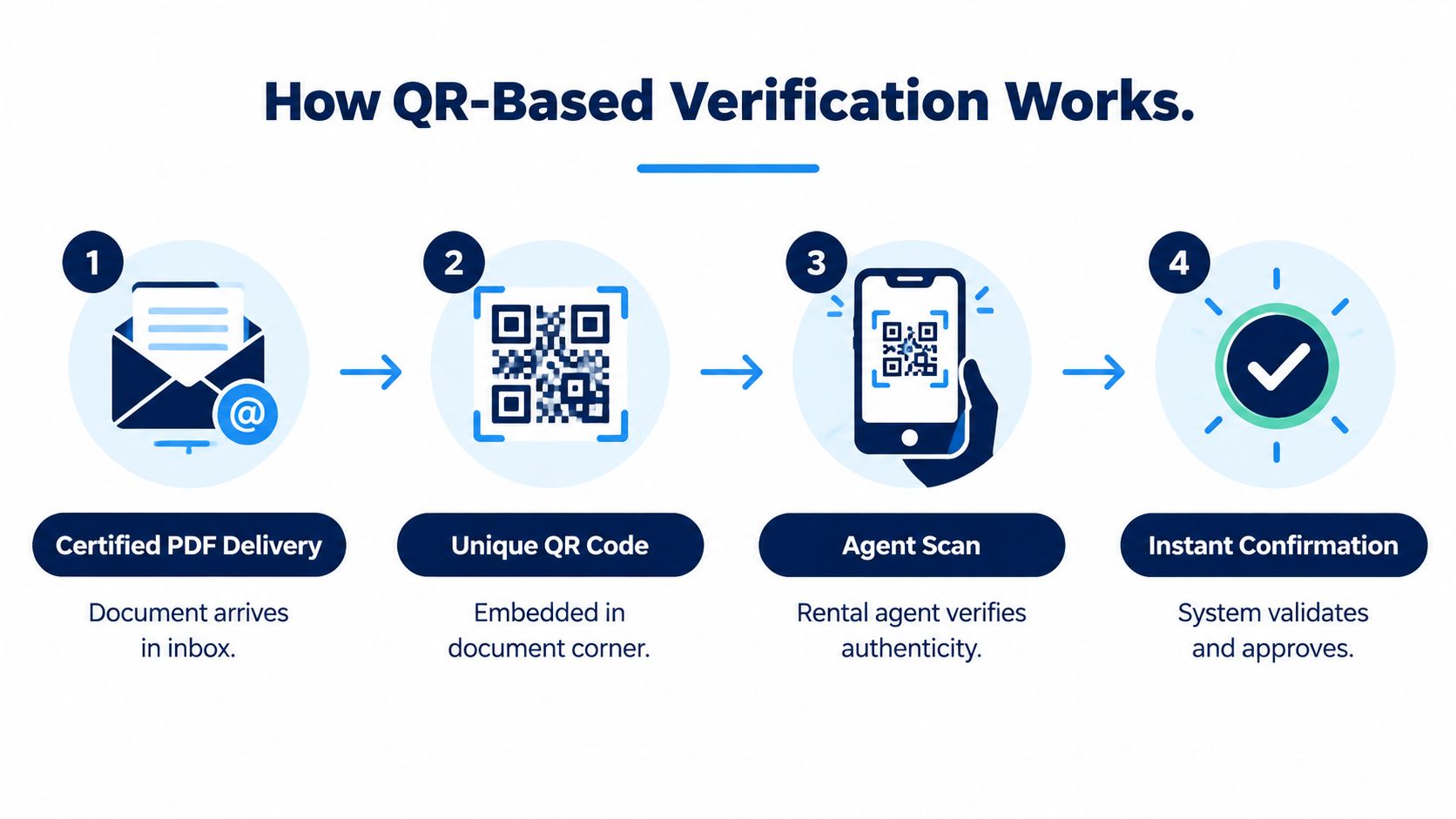
The four-step counter flow
- The certified PDF arrives. The traveler opens the document from an inbox, secure dashboard, or device folder.
- The QR code is located. A unique code appears in a designated area of the document.
- The agent scans it. The rental agent uses a phone or scanner to read the code, which directs the device to a verification portal.
- The portal returns a result. The agent compares the displayed record with the document and original licence.
Depending on the system, the portal may display identifying fields such as the document number, holder name, issue date, and issuing authority. The agent can then check whether the record corresponds to the person standing at the desk and the file being presented.
Why the issuer-controlled record matters
A paper stamp can be familiar, but a distant agent may need to email or call someone to confirm it. A connected portal can give the agent a direct checking route, assuming the portal is live and the destination accepts that type of document. The QR code authentication explanation provides more background on this verification pattern.
Forwarding a PDF doesn't automatically make it genuine. The important question is whether the code and reference lead to a record that matches the issuer's data. If the file has been altered, the displayed details may no longer correspond to the original record, or the system may flag the mismatch.
A QR code should support verification, not replace common sense. Compare the portal result with the original licence, the traveler's identity, and the destination's rules.
The traveler should also check the link before departure. A QR code that opens an unfamiliar domain, requests unnecessary personal information, or produces a vague result deserves caution. The goal is a quick, visible connection between the presented document and a controlled verification record.
Why Licence Translations Fit the Digital Model
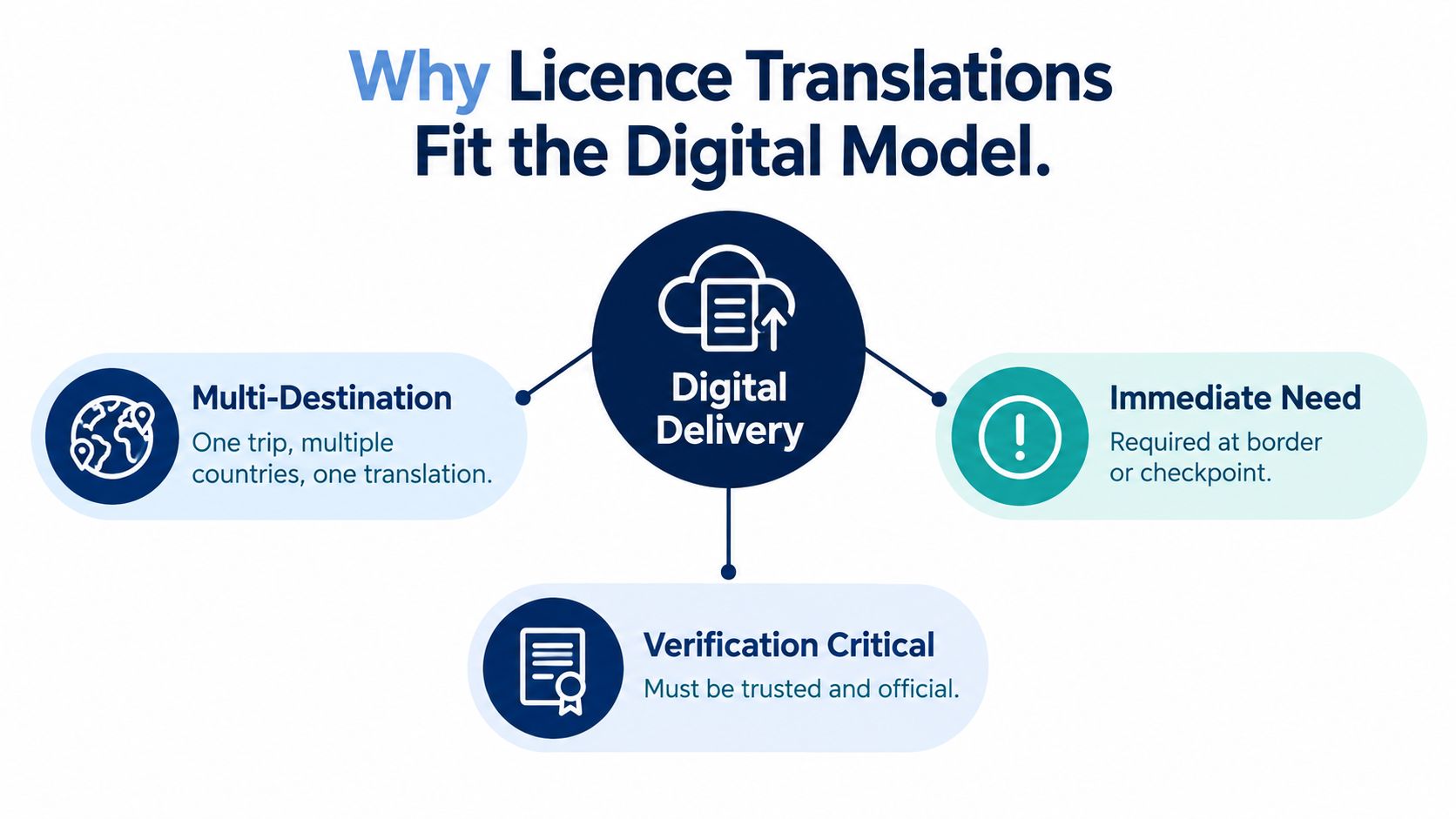
Driving licence translations have a practical characteristic that makes them well suited to digital delivery. They're often needed as a readable companion to a physical card, so the traveler already carries the underlying original. The digital file adds language access without pretending to replace the source document.
One journey can cross several language settings
A traveler may collect a rental car in one country, drive across a border, and speak with a different rental company or road authority later. A digital companion can remain available throughout the trip without a new shipment to each destination. If the provider offers the required language and the local recipient accepts the format, the traveler can present the same translation pack again.
This is particularly useful when the problem is legibility rather than ownership. The original licence establishes the legal identity of the driving credential. The translation helps the receiving person understand fields that may otherwise be difficult to interpret.
It responds to changing itineraries
Travel plans rarely stay fixed. A traveler may change a pickup location, extend a rental, or arrange a vehicle after landing. A digitally delivered file can be accessed near that decision, instead of requiring a new postal cycle.
The file also supports controlled re-access. A traveler can keep it in a secure account, download it again, or store a backup for a later counter interaction. That doesn't guarantee acceptance, but it reduces the practical risk of being unable to show the document.
Readability still needs authority
A translation can look polished and remain unsuitable if the issuer is unclear or the destination requires a different permit. Before ordering, check the provider's certification approach, language coverage, verification method, and acceptance caveats. The travel document translation guide can help distinguish a translation companion from other travel-document formats.
The central fit is simple: the original card stays with the driver, while the digital translation travels alongside it. That pairing addresses language friction without confusing a readable companion with an official driving authorization.
Where Digital Ends and Official IDPs Begin
A digital licence translation is not an official International Driving Permit. An IDP is a government-authorized booklet issued through an authorized national organization, and it translates a domestic licence into standardized categories under the relevant international arrangements, including the 1949 and 1968 Geneva and Vienna conventions.
A translation companion serves a different purpose. It helps a rental employee, police officer, insurer, or road authority read information from the original licence in a familiar language. It doesn't independently grant driving privileges, change the licence categories on the original card, or replace an IDP where local law requires one.
| Feature | Digital Translation Companion | Official IDP |
|---|---|---|
| Issuing authority | Translation provider | Authorized government or automobile association channel |
| Format | Digital file, often with an optional printed version | Physical standardized booklet |
| Primary role | Makes the original licence easier to read | Provides an internationally recognized permit format |
| Relationship to home licence | Must be carried with the original licence | Must also be carried with the original licence |
| Acceptance | Decided by the local recipient or authority | Depends on the destination's legal requirements and treaty framework |
| Verification | May use a QR code or online portal | Relies on the booklet, issuing authority, and applicable rules |
The questions to ask before departure
Check three signals:
- Who issued it? A translation company and an authorized IDP issuer aren't the same type of organization.
- What format did you receive? A PDF or translation booklet isn't automatically the standardized IDP booklet.
- What does the destination require? A rental clerk may accept a translation companion, while a police officer or border authority may require an IDP.
Acceptance is always decided locally by the relevant clerk, officer, embassy, insurer, or road authority. A translation companion can make your original licence understandable, but it can't override a legal requirement for an official permit.
A Simple Trust Checklist Before You Rely on a Digital Document
Run the checks before you leave for the rental counter, not while the queue is waiting behind you. The same method works for other digitally delivered travel records, including insurance certificates and health documents.
- Confirm the issuer. Look for a clearly identified provider with an appropriate certification or authorization process. Don't rely on a document whose origin is difficult to establish.
- Test the QR code. Scan it before travel and confirm that it reaches a public verification portal with a meaningful result, rather than an unrelated page or a blank form.
- Inspect the file protection. Check for a digital signature, tamper-evident feature, hash, or other method that can reveal whether the document has changed after issuance.
- Match every key identity field. Compare the holder's name, licence number, categories, and dates with the original physical licence. Even a small mismatch can create doubts at the desk.
- Check local acceptance. Ask the rental company or relevant authority whether it accepts a translation companion, and whether it also requires an official IDP or another physical document.
Prepare for the failure points
Save the document where you can access it without searching through an old email. Keep the original licence with you, charge the phone, and carry a printed backup when the destination or service provider may not support digital checks.
Trust also depends on scope. A provider should state clearly whether its document is a translation, an official permit, or another type of record. For trips where an official IDP is legally required, use an authorized issuer rather than treating a digitally delivered translation as a substitute.
World Driving Permit offers certified driving licence translations delivered digitally, with QR verification and an optional printed booklet, while stating that the service isn't an IDP or government document. Visit World Driving Permit to review its translation option and check whether your destination calls for a companion translation, an official IDP, or both.