
QR Code for Authentication
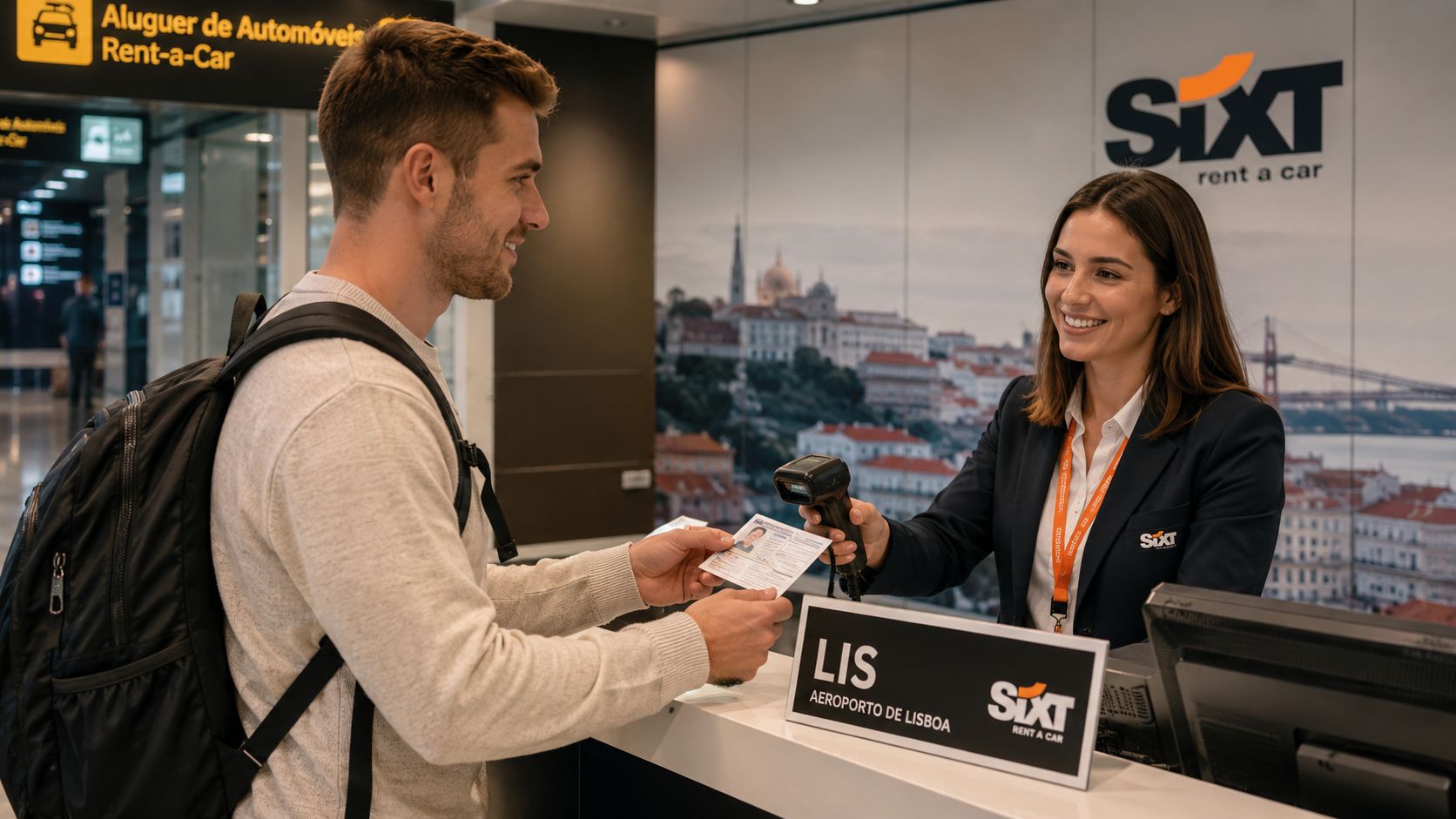
You're standing at a rental counter in Lisbon with your home-country driving licence, a printed translation, and a queue forming behind you. The agent can read your name, but the licence categories and dates are written in a script they don't understand. Instead of studying the paperwork under the counter lamp, they open a scanner app and aim a phone at a square printed beside the translation.
That square is a QR code for authentication, but the square itself isn't proof that the document is genuine. It's a way to carry information between the licence, the verification system, and the person deciding whether the document can be trusted. The important questions are whether the document came from the claimed issuer and whether anyone changed its contents after it was created.
Table of Contents
- A Rental Desk Scans a Translated Licence
- What QR Codes Actually Carry in Authentication
- Three Security Designs for QR Authentication
- How Rental Desks and Authorities Verify a Document
- Inside a Certified Translation Workflow With QR Verification
- Quishing and the Trust Gap QR Codes Cannot Solve Alone
- Troubleshooting Common QR Verification Problems
- Your Quick Reference for Trustworthy QR Verification
A Rental Desk Scans a Translated Licence
At the Lisbon airport counter, the traveller turns the translated licence toward the agent. The original home-country licence remains beside it, because the translation is a readable companion, not a replacement for the underlying driving credential. The agent reaches for a phone, aligns the camera with the printed QR square, and waits while the verification portal loads.
The pause is brief, but it carries weight. The agent's eyes move between the traveller's name on the original licence, the translated fields on the paper, and the digital record shown on the phone. If the record matches, the conversation can move from “Can I read this document?” to “Which vehicle and insurance option would you like?”
Why the square matters
The QR code gives the agent a practical route to a trusted record. It can point to a verification portal or carry information that the scanner can validate, depending on how the issuing organisation designed the credential. A well-designed flow helps the agent confirm the translated name, licence class, issuing country, and other fields without relying only on visual familiarity.
Travellers with non-Latin-script licences often feel this friction most sharply. A rental employee may be comfortable checking a familiar European licence layout, yet struggle to interpret a document written in Arabic, Cyrillic, Greek, or another script. A readable translation reduces that language barrier, while QR verification adds a way to check that the translation corresponds to an issued record.
Counter reality: The agent isn't deciding whether a QR pattern looks official. They're deciding whether the document, its issuer, and its displayed data agree.
The same scene also exposes the limits of the technology. A damaged print may not scan. An airport network may fail. A sticker could cover the original code. A stolen document might still be presented by the wrong person. Authentication therefore has to combine the visible document, the QR workflow, the issuing authority, and human judgement.
The emotional stakes are simple. One person needs keys for a journey, while another must trust a document issued thousands of kilometres away in a language they can't read.
What QR Codes Actually Carry in Authentication
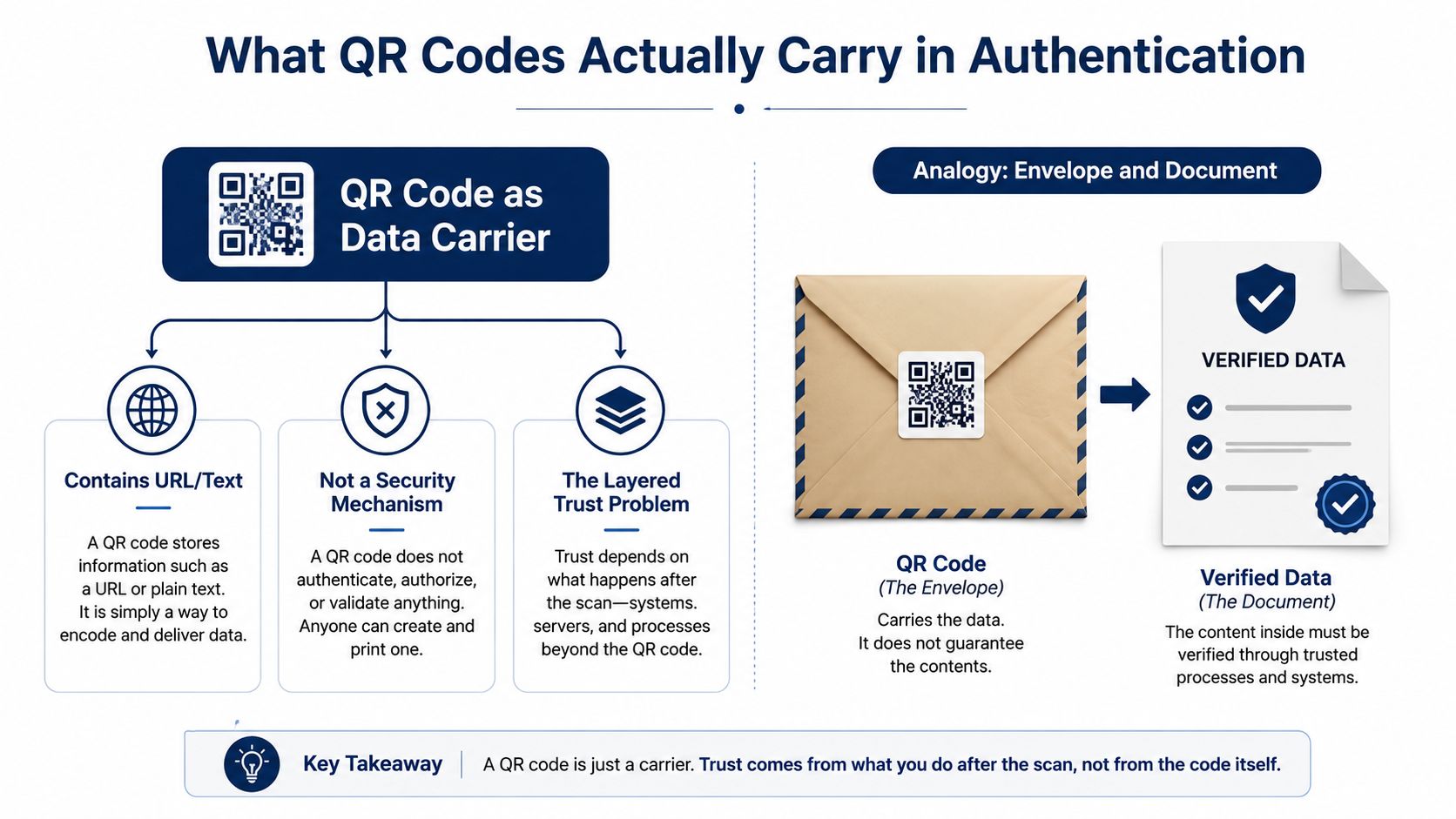
A QR code is a data carrier, not a security mechanism by itself. It can hold text, a URL, a document reference, or a compact token, but it doesn't automatically prove who created that information. Anyone can print a visual pattern that leads somewhere, so the trust comes from the system behind the scan.
Think of the QR code as a sealed envelope. The envelope carries a letter containing the translated licence details. A cryptographic signature works like a wax seal that can reveal whether the letter came from the claimed sender and whether someone rewrote it after signing.
For a translated licence, the payload might contain:
- Licence reference: A document number or unique identifier.
- Issuing context: The country and authority associated with the original credential or translation.
- Holder details: The name and relevant identity fields needed for comparison.
- Driving scope: The document type and licence categories or classes.
- Document dates: Issue information and validity details.
- Verification pointer: A URL, nonce, or token that connects the scan to a recognised record.
The exact fields depend on the issuer. A QR code can carry a simple public lookup address, or it can carry signed metadata that a reader checks before contacting a server. In both cases, the printed square is only useful when the scanner or portal knows which issuer to trust and how to validate that issuer's cryptographic material.
Authentication asks two separate questions
The first question is provenance: who issued this document? The second is integrity: has the data changed since the issuer created or approved it?
A translated licence could display a perfectly accurate name but still be unauthorised. It could also come from a legitimate provider but contain an altered licence class or date. A signature, issuer key, trusted portal, and document record work together to address those separate concerns.
QR codes have a mature technical foundation. AIM approved the QR Code specification in 1997, Japan's JIS X 0510 followed in 1999, and ISO/IEC 18004 established it as an international standard in 2000. Later revisions arrived in 2006, 2015, and 2024, with the 2024 edition improving encoding efficiency, error correction, and structured append handling, as documented in the QR Code standard history.
That history explains why a QR code can transport a one-time token, signed reference, or verification pointer reliably. It doesn't turn the symbol into an authenticator. The trust is created by the signature, the issuer's key, the session rules, and the verification service.
Three Security Designs for QR Authentication
At a rental counter, the design determines what happens after an agent scans a translated licence. Does the code open a record, carry proof that the issuer approved the details, or begin a fresh exchange with the verification service? The answer depends on the required assurance, available connectivity, and the risk of copied codes.
| Design | Security Strength | Connectivity Needed | Replay Resistance | Best For Rental Desks |
|---|---|---|---|---|
| Static QR pointing to a public record | Basic, dependent on server checks | Usually needed for current status | Weak, the same reference can be reused | Simple document lookup where the printed code is only an index |
| Cryptographically signed QR with embedded metadata | Stronger integrity and issuer verification | Can support offline validation, depending on the reader | Better, especially when expiry and document status are included | Counters needing a fast authenticity check with intermittent connectivity |
| Challenge-response QR | Strong session binding and freshness | Required for the live exchange | Strong, because each scan can use a one-time challenge | High-trust workflows where replay or relay risk matters |
Static lookup codes
A static QR code works like an index card. It points the agent to a public record associated with the translation or document identifier. Printing is simple, and the workflow is easy to explain during a busy handover.
Its limitation is persistence. The same code can appear on every copy, and the visible pattern provides no tamper signal by itself. The server must still identify revoked, replaced, or duplicated records. A copied photograph may continue pointing to a real record unless the service checks the document's current status and surrounding context.
This design suits a counter that mainly needs a readable lookup. It provides less evidence that the name, licence class, or dates printed on the translation belong to one specific approved document.
Signed payloads
A signed QR carries issuer identity and integrity information with the document data. The reader checks the signature against a trusted public key, much like comparing a seal with a known seal design. If someone changes the holder name or licence class after signing, the signature check should fail.
The design can support quicker decisions because some validation may happen before a network call. That can help a rental desk with unreliable connectivity. The issuer still has to protect its private keys, distribute trusted public keys, and ensure that rental software understands the signed format.
Challenge-response flows
Challenge-response adds a fresh exchange to the scan. The reader or portal supplies a challenge, and the document or issuer returns a response tied to that session. A photographed QR copied from an earlier interaction should not work in the same way because the new request expects a different response.
The OASIS SQRAP specification describes a design in which the QR carries a nonce and expiration time and is cryptographically signed by a trusted entity, reducing replay and substitution risk through its secure QR authentication requirements.
For an agent deciding whether to hand over keys, a signed, short-lived exchange can balance speed and assurance. Static lookup is simpler. Challenge-response fits workflows where copied screenshots, photographed documents, or active relay attempts pose a serious concern.
How Rental Desks and Authorities Verify a Document
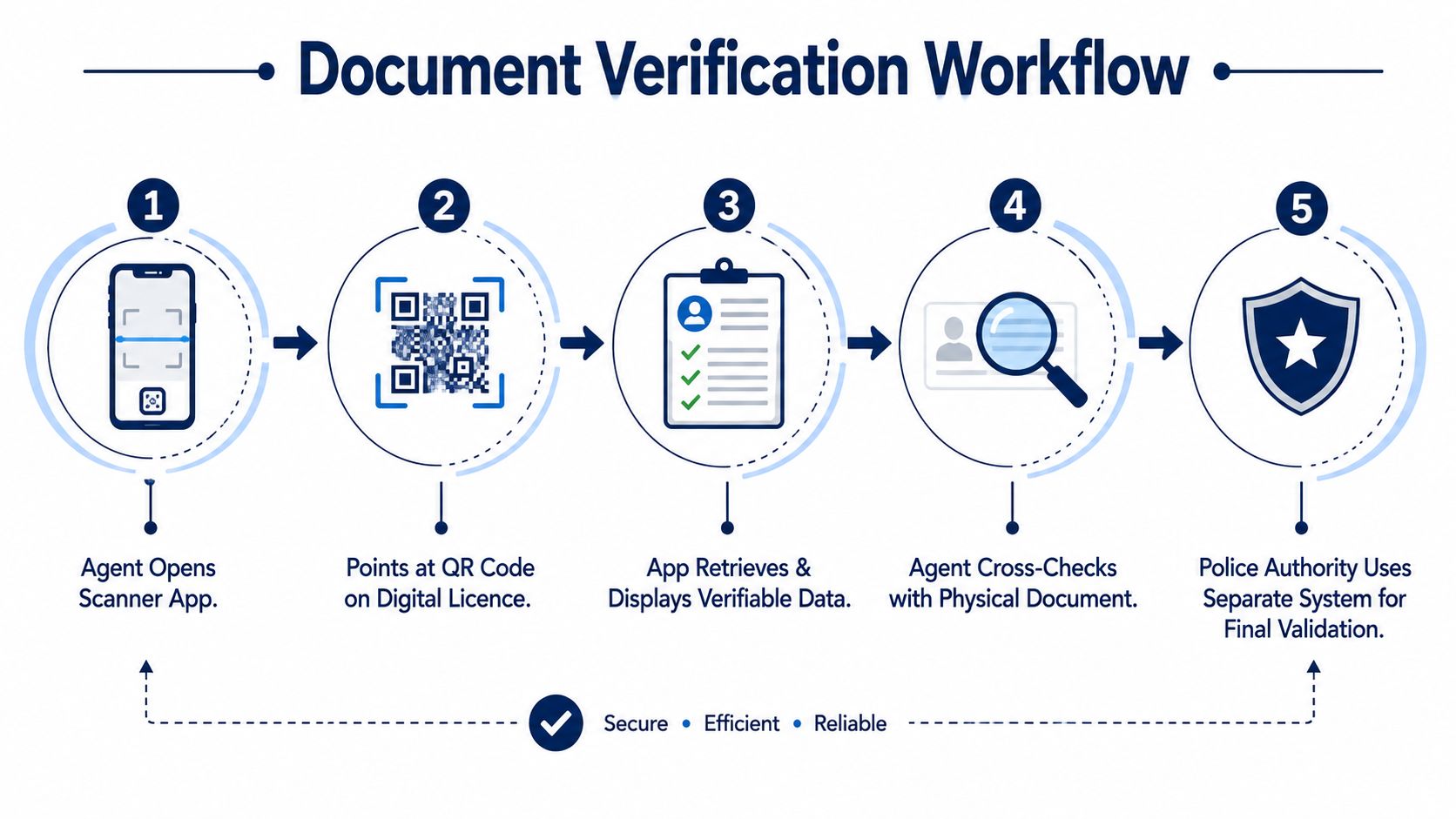
The agent starts by opening an approved scanner app, not by using whichever camera shortcut happens to appear first. The phone reads the QR pattern and parses its contents. That may reveal a verification URL, a document identifier, signed metadata, or a session reference.
The scanner then checks whether the data is structurally intact. A readable pattern can still contain an untrusted destination, so the application should show the issuer and verification context before the agent relies on the result. The agent compares the displayed name and document details with the original licence and the printed translation.
The live portal exchange
If the workflow uses an online portal, the device contacts the issuing organisation's endpoint over an encrypted connection. It submits the document reference and, where supported, a one-time challenge. The service checks the record, signature, validity state, and any session restrictions before returning a result.
A useful response gives the agent information they can compare:
- Issuance status, such as recognised, revoked, or unavailable.
- Holder name, matched against the original licence and translation.
- Licence class, compared with the vehicle category the traveller wants to rent.
- Relevant dates, including issue or expiry information where the record provides them.
- Integrity result, showing whether the signed data matches the stored document.
The visual colour is secondary. A green screen is useful only when the portal domain, issuer identity, and record details are also credible.
Offline and accountable checks
Police authorities or other inspectors may use a separate validation system, including cached issuer data or a controlled offline reader. Offline capability can confirm a signed payload, but it may not show live revocation or replacement status unless the cache has been updated. That distinction matters when an agent asks whether a document is authentic now, rather than whether it was authentic when issued.
For a counter team, network requirements for document verification should be part of the operating procedure. Scan logs also protect both sides. A record of the time, document reference, result, and responsible workstation can help resolve a dispute without forcing the traveller or agent to rely on memory.
Inside a Certified Translation Workflow With QR Verification
A traveller begins by uploading a photo of the original driving licence. Optical character recognition extracts the visible fields, but the machine doesn't get the final say when a character, category, or date is unclear. A human translator reviews the source and reconciles ambiguity before preparing the destination-language version.
That combination matters at a rental counter. OCR can make document production faster, while human review checks the places where a camera or unusual licence layout may misread the source. The finished translation must remain a readable companion to the original, because the QR code can support authenticity without replacing the underlying credential.
Four stages from licence image to scan
| Stage | Artefact Produced | Trust Guarantee Added |
|---|---|---|
| Source capture | Photograph or scan of the original licence | Establishes the document input for translation |
| Review and translation | Certified translated PDF | Adds language accuracy and human reconciliation |
| QR registration | Document hash and matching QR reference | Binds the printed translation to a specific record |
| Counter verification | Portal result or validated signed payload | Lets the agent compare issuer, data, and integrity |
The certified PDF is rendered with a unique document hash. A matching QR code is printed in the margin, creating a visible connection between the paper translation and its digital reference. The payload is signed with the issuer's private key and registered against that hash in a verification database.
When the agent scans it, the system checks the signature against the issuer's published public key. It then matches the document hash to the registered record and displays the relevant fields for comparison. If the paper has been edited after signing, the calculated hash should no longer match the registered value.
Important distinction: The QR code authenticates the translation record. It doesn't grant driving permission, replace the original licence, or guarantee that every local authority must accept the document.
For travellers planning a trip, the travel document translation guidance helps separate a readable translation companion from an official international driving permit. Acceptance remains a local legal and rental-policy question.
In practical terms, a QR-enabled translation gives the Lisbon agent another source of evidence. The agent still checks the physical licence, the traveller's identity, and the rental company's rules. The code makes the authenticity conversation faster and more structured.
Quishing and the Trust Gap QR Codes Cannot Solve Alone
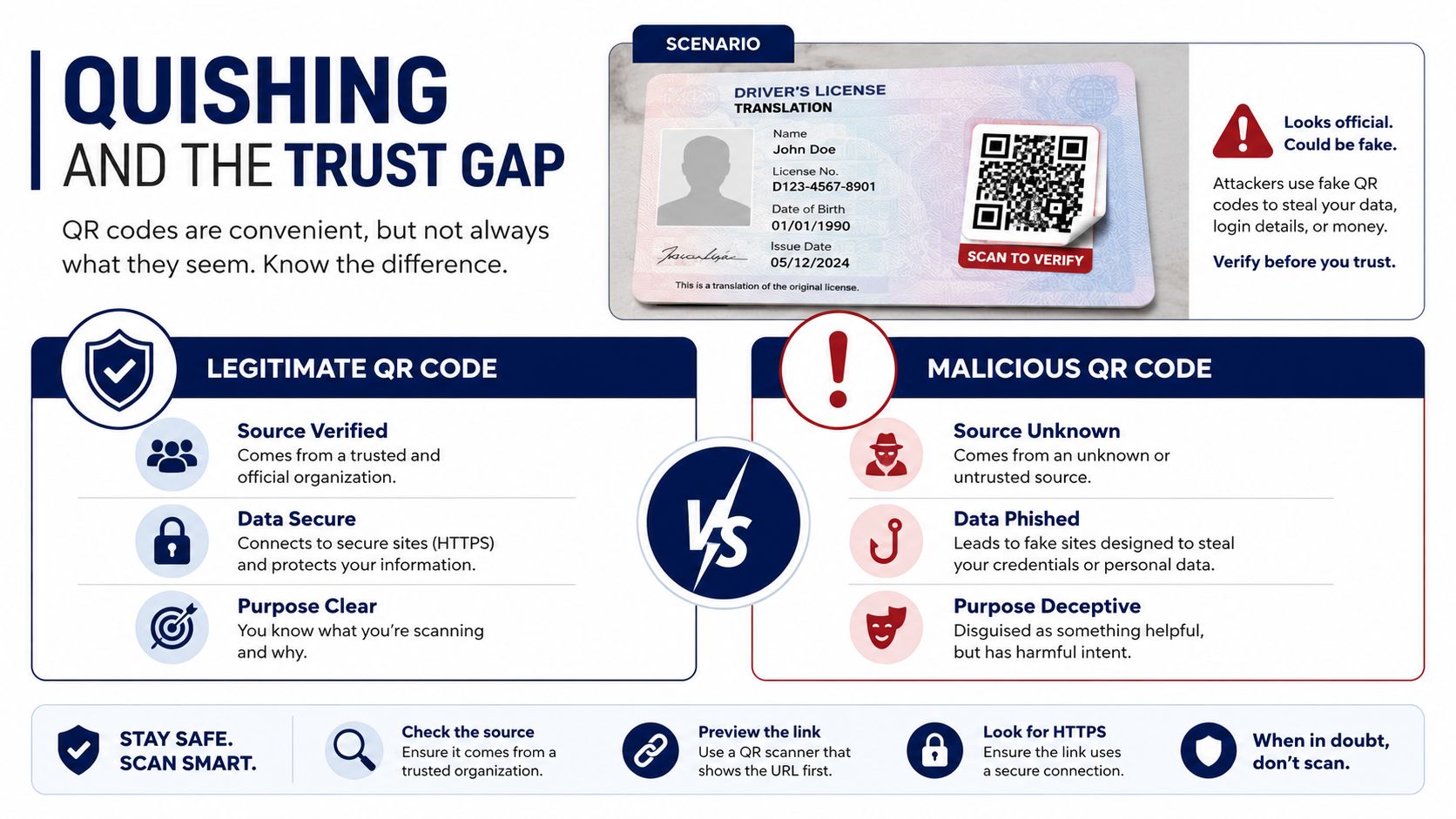
A QR code can support a legitimate verification flow, but a QR code can also hide a malicious destination. That attack pattern is commonly called quishing, and it works because the user sees an image rather than an obvious web address before scanning.
Consider a traveller who receives a translated licence by email and sees a QR image in an attachment. Or consider a printed licence with a sticker placed over the original code. The traveller scans it, lands on a convincing imitation of a verification portal, and is asked to enter an account password or payment details. The scanning habit is legitimate, but the code and destination are not.
Threat reporting recorded QR-code phishing detections rising from 7.6 million in January 2026 to 18.7 million in March 2026, a 146% increase, as reported by Cybersecurity Dive's coverage of QR phishing trends. UK Action Fraud recorded 784 quishing reports between April 2024 and April 2025, with almost £3.5 million lost, according to its quishing alert.
What a verification portal can and cannot do
A properly designed portal can help prevent:
- Tampered translations: A signature or hash comparison can expose changes to names, categories, or dates.
- Stale records: The service can show whether a document has been revoked or replaced.
- Issuer impersonation: Trusted keys and recognised domains make it harder to pretend that an unrelated page represents the issuer.
- Replay within a session: Nonces and expiration rules can limit reuse of copied references.
It can't solve every problem. A portal won't stop someone from scanning a malicious code outside the expected workflow. It won't prevent social engineering at a counter, and it can't prove that the person holding a genuine printed licence is the rightful holder.
Before trusting a scan, confirm who supplied the document, inspect the displayed domain, and compare the portal's record with the original licence. Refuse a sticker-covered code until the issuing provider confirms it. Never enter a password, payment card, or unrelated personal information into a page reached from a document-verification scan unless the organisation's official process explicitly requires it.
Troubleshooting Common QR Verification Problems
The first failure is often mechanical, not cryptographic. At the rental counter, a wrinkled translation, glare from a plastic sleeve, poor lighting, low screen contrast, or a damaged QR area can stop the camera from reading the pattern.
Start with the least disruptive fixes. Flatten the paper, remove glare, move the phone slightly farther away, and use the scanner approved by the rental company. If the printed copy remains difficult to read, ask whether the agent can scan the digital PDF instead.
When the code scans but the result is wrong
A scan that opens a generic error page needs more caution than a scan that fails completely. The displayed URL may be mistyped, expired, unsupported, or malicious. Don't keep retrying a suspicious page because the code came from a document that looks professional.
Use the issuing organisation's official website, entered manually or reached from a trusted bookmark, to locate its verification instructions. Then compare the document reference and issuer details through that route. A portal that asks for unrelated passwords, payment information, or excessive personal data doesn't fit a basic translation-authentication task.
A visibly altered QR area deserves manual review. Look for:
- Overlay evidence: A sticker or second print layer covering the original square.
- Pattern inconsistency: Colour, sharpness, or alignment that differs from the surrounding document.
- Record mismatch: A portal name, holder name, or document identifier that doesn't match the paper.
- Unclear ownership: No obvious relationship between the code, the translation provider, and the issuing record.
Escalation is part of secure handling
If the code still won't validate, contact the translation provider through its official support channel. Ask for a reissued certified copy or a fresh digital file rather than accepting an improvised replacement at the counter. Keep the original licence available, because the translation can't stand in for it.
For providers using online document systems, system requirements for document verification should be checked before departure, not for the first time beside the rental queue. If the issuer can't confirm the record and the agent can't independently validate it, refusal may be the safest decision.
Your Quick Reference for Trustworthy QR Verification
Save this checklist before you travel with a translated driving licence.
Verify
- Confirm the issuer: The scan identifies the expected translation provider or authority.
- Inspect the portal: The domain is recognisable and reached through the expected verification process.
- Match the record: The name, licence class, dates, and document reference agree with the paper and original licence.
- Read the result: A coloured status indicator supports the details, rather than replacing them.
Refuse
- Unsolicited codes: Don't trust a QR image delivered through an unexpected email or attachment.
- Sticker overlays: Pause when a printed licence has a second QR label covering the original.
- Credential requests: Leave any page that asks for passwords or payment details unrelated to document verification.
- Unresolved mismatches: Don't accept a record that identifies the wrong holder, issuer, or document.
Expect
A legitimate counter check may take a short time, and a provider may need to reissue a damaged copy. Keep the printed translation and original licence together, and carry a digital fallback for situations where the network or camera fails. A QR code is evidence within an authentication workflow, not proof on its own. The agent's comparison and judgement remain the final safeguard.
World Driving Permit provides certified translations of national driving licences into 28 languages, with digital delivery, an optional printed booklet, and QR verification linked to a public portal. Prepare your readable translation and verification reference before the rental queue by visiting World Driving Permit.