
Authentication Web API Guide for Secure Integrations
A rental platform has a customer waiting at the desk, a partner server submitting a batch of licence images, and a dashboard user checking verification status. All three may call the same authentication web API, but they don't have the same identity, risk profile, or tolerance for interaction. Giving each client a static key because it was quick to issue can expose user-level operations, while forcing a human consent screen onto a batch processor can make a reliable integration unusable.
Authentication is therefore an integration product decision, not a checkbox added after the REST endpoints are designed. The choice affects what a partner can access, how credentials are rotated, how leaked tokens behave, and whether a rental desk workflow remains fast under pressure. This guide applies those decisions to a document translation and verification platform, with examples for rental desk verification, mobile applications, partner dashboards, and bulk OCR submission.
Table of Contents
- Introduction to Authentication for Web APIs
- Categories of Web API Authentication Schemes at a Glance
- API Keys and Simple Token Authentication in Practice
- OAuth2 Flows for Delegated Access and Partner Integrations
- JWT Handling and Secure Token Lifecycle Management
- mTLS and Sender Constrained Tokens for High Assurance APIs
- Recommended Authentication Flows for World Driving Permit API
- Quick Reference Checklists and Cross Referenced Resources
Introduction to Authentication for Web APIs
Start with two separate questions. Authentication asks who or what is making a request. Authorization asks which operation that identity may perform. A partner server might authenticate as a rental agency workload, then receive authorization only for OCR submission and verification-status retrieval. A staff member might authenticate as an individual, with permission to view orders assigned to that user's organization.
That distinction matters because a credential can identify an application without identifying a person. API keys are generally project or integration credentials. OAuth 2.0 can represent delegated access, where a user authorizes a client to act within defined limits. A JWT is a token format that can carry signed claims, but it doesn't automatically define how the token was issued or what consent occurred. mTLS adds another identity signal by requiring the client to prove possession of a certificate during the TLS connection.
OAuth 2.0 became a foundational authorization standard for web APIs when RFC 6749 was published in October 2012. The specification defines how a third-party application can obtain limited access to an HTTP service for a resource owner or on its own behalf, and it replaces OAuth 1.0. Modern implementations need the later guidance in RFC 9700, published in January 2025, which updates the OAuth security model and related specifications.
Practical rule: Choose credentials according to the caller's identity and the consequence of misuse, not according to whichever flow your framework makes easiest.
A useful way to handle the decisions is:
- Public mobile or browser client: Start with Authorization Code plus PKCE. Add sender-constrained tokens when replay risk justifies the extra work.
- Partner dashboard with a user: Use delegated OAuth access and narrowly defined scopes.
- Controlled agency server: Use Client Credentials, then add mTLS for high-value or bulk traffic.
- Low-sensitivity sandbox or tightly controlled lookup: An API key may be sufficient, provided it identifies the integration rather than a human.
- Token validation across services: Use JWT claims and signature checks, but treat JWT as the credential format, not as the entire authorization design.
The detailed sections below are intended as a lookup reference. Go to the API key section when a partner needs a simple server credential. Use the OAuth section for user consent and partner delegation. Use the JWT section when token validation, storage, and key rotation are the problem. Choose the mTLS section when a leaked bearer token must not be usable by an unrelated caller.
Categories of Web API Authentication Schemes at a Glance
The main schemes differ in what they trust. An API key trusts possession of a provisioned secret associated with an application or project. OAuth 2.0 trusts an authorization server to issue a token representing a permitted relationship between a client, a resource owner, and an API. JWT trusts a verifiable signed token and its claims. Mutual TLS trusts a client certificate presented during the transport handshake.
These categories overlap in production. OAuth access tokens are often JWTs, and an OAuth client may also authenticate to the token endpoint with mTLS. Treating them as interchangeable creates design confusion. OAuth describes authorization flows and token issuance. JWT describes a compact signed representation. mTLS describes a certificate-backed channel and client identity.
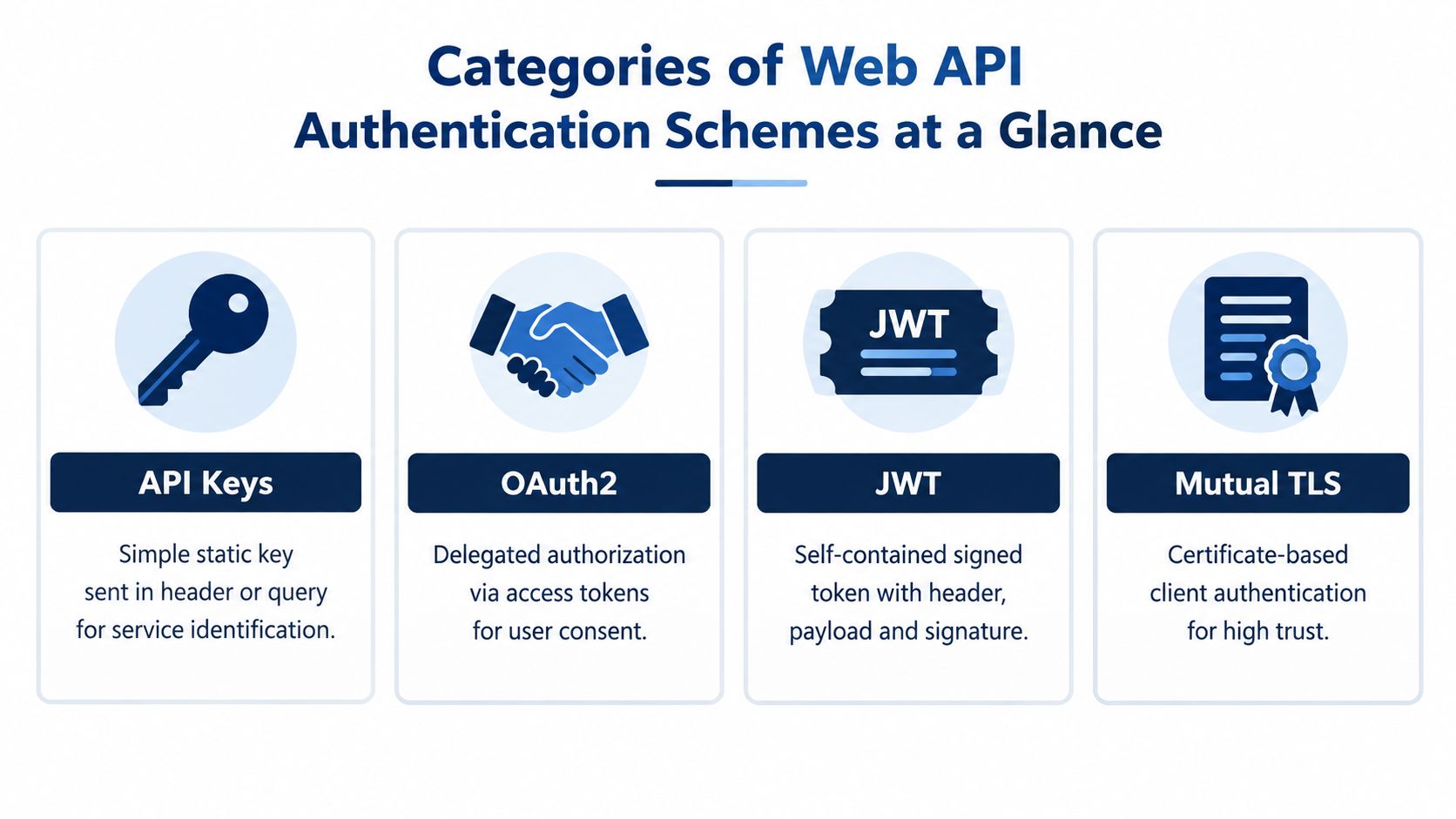
Authentication Scheme Comparison Matrix
| Scheme | Security Model | Scope Control | Best Fit |
|---|---|---|---|
| API keys | Shared secret proves possession of an integration credential | Usually coarse unless the platform adds permissions | Sandbox access, controlled server lookups, low-sensitivity workloads |
| OAuth 2.0 | Authorization server issues access after client or user authorization | Strong, through scopes, audience, consent, and token policy | Partner dashboards, mobile apps, delegated user actions |
| JWT | Signed claims are validated by the receiving API | Depends on claims, issuer policy, and enforcement rules | Stateless access-token validation across services |
| Mutual TLS | Client proves possession of a private key tied to a certificate | Commonly combined with OAuth scopes or certificate identity | Controlled server-to-server and high-assurance bulk traffic |
For a public mobile application, API keys don't protect a secret because the application package can be inspected and the key can be copied. OAuth with PKCE separates the public client from the user authorization process. JWT may carry the resulting access token, but the API still needs to validate issuer, audience, expiry, and permissions.
For an agency server submitting document images, the trust model is different. The server can protect a credential, accept certificate rotation procedures, and operate without an interactive user. Client Credentials is usually the logical OAuth grant, while mTLS can bind the token exchange and resource calls to the approved workload.
For QR-based verification, the user experience may involve scanning a document and retrieving a limited verification result. A public verification surface can use a constrained reference or challenge model, while private order data should remain behind authenticated API routes. Teams evaluating QR workflows can also review QR codes for authentication, but the QR itself shouldn't be treated as a replacement for authorization.
A signed token proves what the issuer signed. It doesn't prove that the caller is the intended user, that the token reached the correct API, or that the token can't be replayed.
API Keys and Simple Token Authentication in Practice
A rental partner may need a credential that its server can use to submit driving-permit images in batches. An API key handles that integration with little setup: the client sends the key in a request header, the API maps it to the partner integration, and the request continues only if the credential is active and permitted. Query parameters can carry keys, but headers reduce exposure through browser history, proxy logs, analytics systems, and support screenshots.
The key identifies the integration, not the person standing at a rental desk. It fits controlled bulk OCR submission, verification-status retrieval, and sandbox testing. It does not provide separate operator identities, consent records, or user-level audit trails for a dashboard.
A Safer Provisioning Pattern
Issue credentials per environment and per integration. Never place a production key in a mobile bundle, public JavaScript application, support ticket, or repository. Store it in the partner's server-side secret manager, then assign an owner for access reviews.
A practical lifecycle includes:
- Issue separately: Keep sandbox and production credentials distinct. Do not allow silent promotion between environments.
- Limit permissions: Associate each key with the endpoints the integration needs, such as OCR submission or verification-status retrieval.
- Restrict its context: Apply server-side controls, including approved network paths where the deployment model supports them.
- Rotate deliberately: Create a replacement, deploy it, verify traffic, and disable the old credential.
- Audit usage: Record the integration identity, endpoint, result, and correlation identifier. Avoid retaining document content unless the workflow requires it.
The main failure occurs when a team treats an API key as a user login. A leaked key can let an attacker act as the entire integration, while a shared key obscures which operator initiated a request. OWASP identifies broken authentication as a primary API risk and advises established standards instead of custom authentication, token generation, or password storage. Its broken authentication guidance for APIs also recommends stronger anti-brute-force controls for authentication endpoints and warns against using API keys as user authentication.
Credential boundary: If the API operation must answer “which user approved this action?”, an API key alone is the wrong boundary.
Use a key for a low-friction World Driving Permit integration when application-level identity is acceptable and the credential can remain protected. User-scoped order access, consent, and sensitive account operations need OAuth with narrow scopes. Teams implementing a basic key check can review how to check an API key, then test the production design against the actual caller and audit requirements.
OAuth2 Flows for Delegated Access and Partner Integrations
OAuth 2.0 is the right tool when a client needs a controlled authorization relationship rather than a permanent shared secret. The flow determines how the client proves its identity, whether a user is involved, and how the authorization server limits the resulting access token.
Current best practice strongly favors Authorization Code with PKCE for public clients. RFC 9700 updates the OAuth threat model, discourages the Implicit and Password grants, recommends exact redirect URI matching, and identifies PAR as an option for high-security deployments. For a travel platform, that means the authorization request and token exchange deserve the same engineering care as the protected verification endpoint.
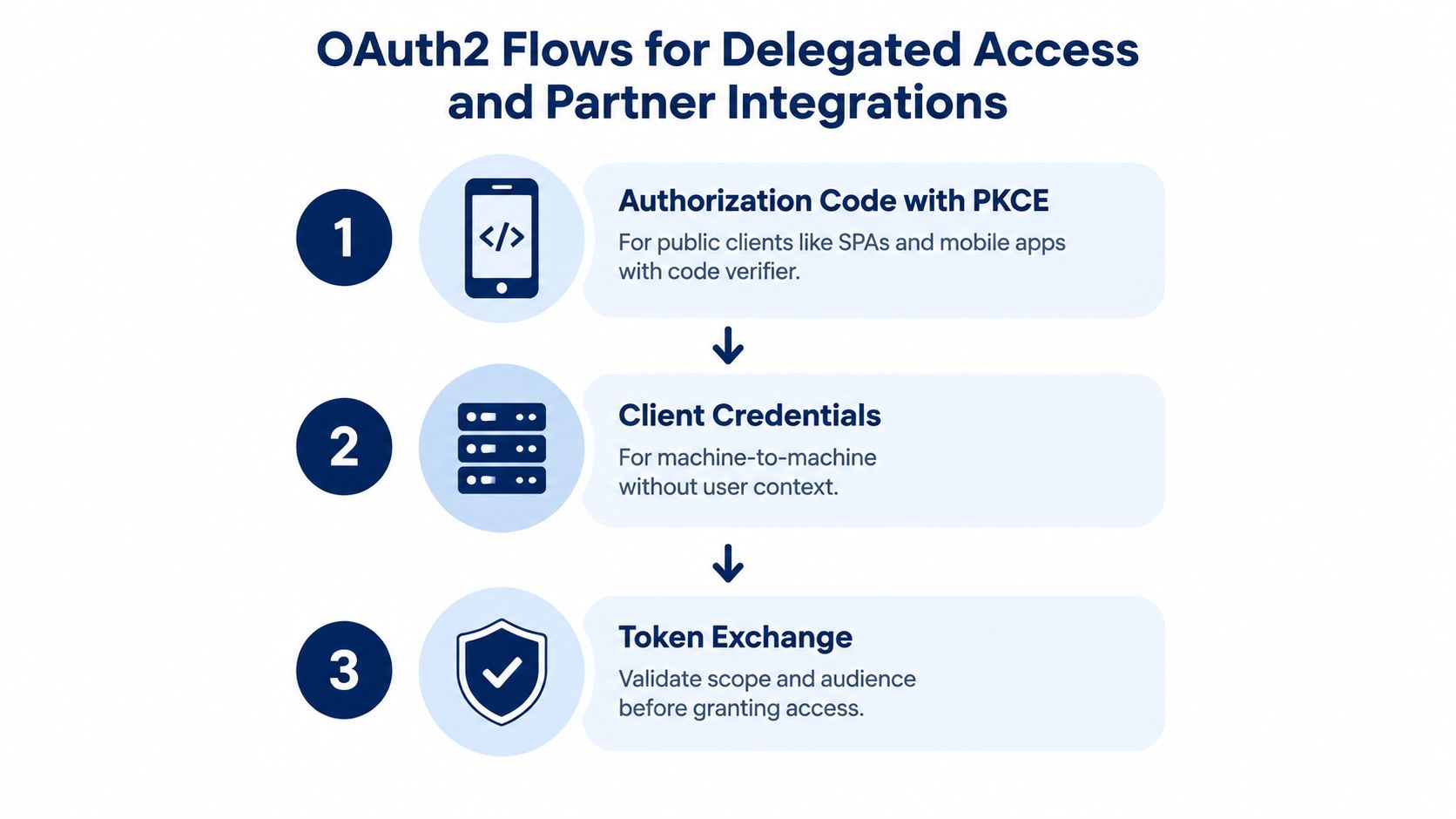
Authorization Code With PKCE
A mobile app or browser client begins by creating a code verifier and deriving a code challenge. It sends the challenge to the authorization endpoint, where the user authenticates and approves the requested permissions. The authorization server returns a short-lived code to the exact registered redirect URI. The client then sends the code and verifier to the token endpoint, and the server issues an access token only if the verifier matches.
For a rental platform checking a customer's translated licence:
- The platform requests a narrow scope for order lookup or verification-status retrieval.
- The user authenticates through the authorization service.
- The platform receives a code, not an access token, through the redirect.
- The platform presents the code verifier at the token endpoint.
- The API receives an access token with the intended audience and scopes.
- The platform calls the verification endpoint and records the request under the correct user and organization.
PKCE protects the authorization code if an attacker intercepts it, because the attacker doesn't possess the verifier. It doesn't make a public client confidential, and it doesn't justify embedding a client secret in a mobile application.
Client Credentials For Workloads
Client Credentials is designed for machine-to-machine access without a human context. A bulk agency server can authenticate as a registered workload and request scopes such as ocr.submit or verification.read. The API should keep those scopes narrowly aligned to actions, not broad account access.
A separate workload identity also improves incident response. If one partner's OCR connector is compromised, the platform can disable that client or reduce its scopes without invalidating every human user's session. For controlled server-to-server traffic, asymmetric client authentication and mTLS provide stronger identity than a shared secret.
Token Exchange And Scope Discipline
Token exchange is useful when one trusted service receives a credential and must obtain a token for a different audience or delegated context. The receiving authorization server should validate the subject, requested audience, client, and scopes before issuing anything. Never pass a broad user token through every internal service because it is convenient.
The OAuth authorization server should issue short-lived access tokens and rotate refresh tokens. Sender-constrained tokens can reduce replay risk, which is covered in the mTLS section. JWT is a possible access-token format, but the resource server must still validate every security-relevant claim.
The following video provides a visual OAuth flow reference for teams documenting their own sequence diagrams.
Don't use the Implicit grant for a new public client, and don't collect a user's password inside a partner application merely to obtain an API token. Those patterns collapse authorization into credential handling and make the partner responsible for risks the authorization server should contain.
JWT Handling and Secure Token Lifecycle Management
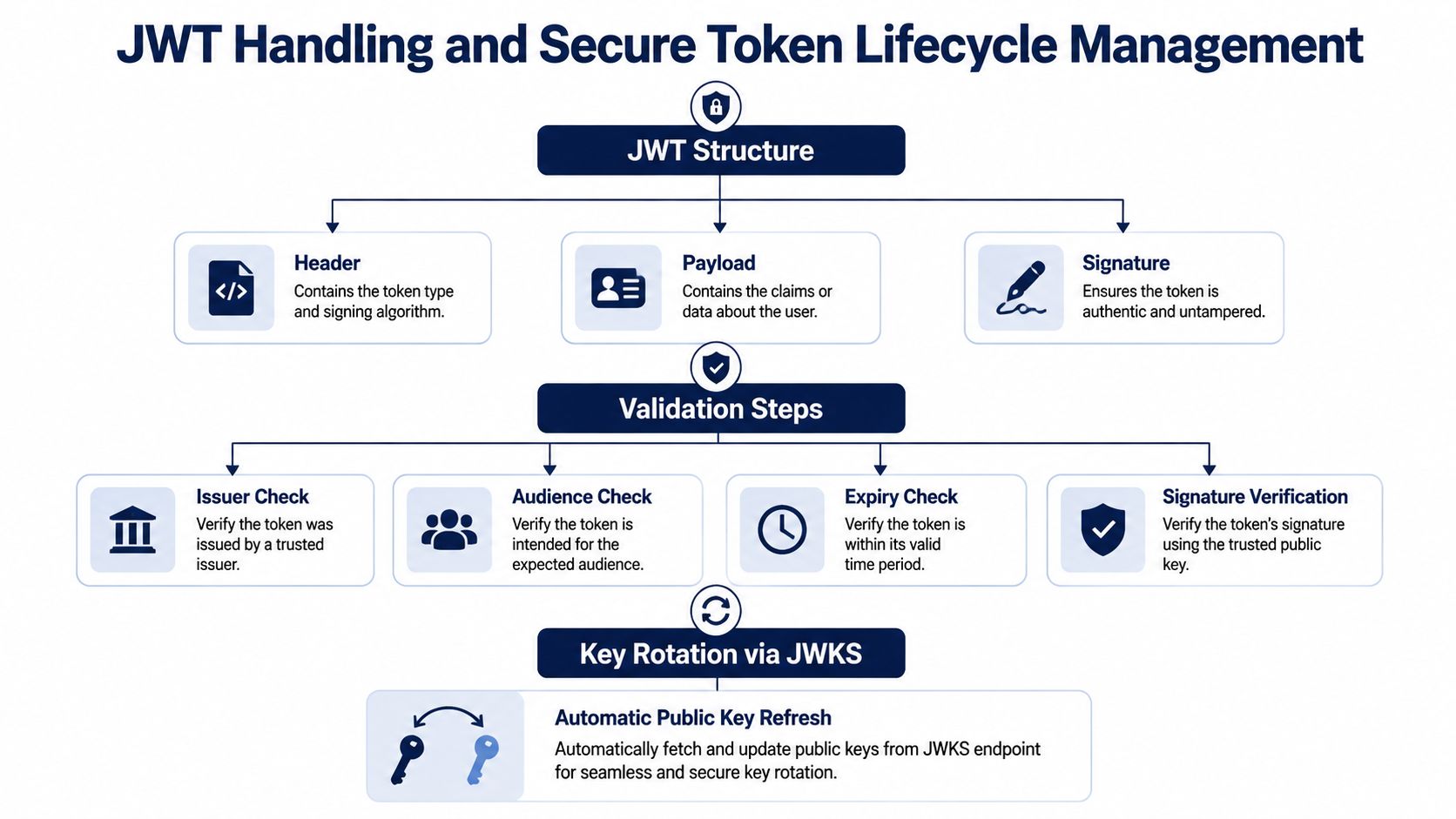
JWT is a token format, not an authentication flow. A JWT can be issued after Authorization Code with PKCE, Client Credentials, or another controlled process. The resource server then validates the token's structure, signature, issuer, audience, lifetime, and authorization claims before processing the request.
A JWT has three conceptual components:
- Header: Identifies the token type and signing algorithm metadata.
- Payload: Carries claims such as subject, issuer, audience, scopes, and expiry.
- Signature: Proves that the trusted issuer signed the header and payload without alteration.
The payload is encoded, not confidential. Never place passwords, private keys, or unnecessary document data inside it. A token that contains an order identifier and narrowly defined scope can support a verification lookup. It shouldn't become a portable copy of the customer's licence record.
Validation At The Resource Server
A verifier should reject tokens that fail any required check. The sequence is more important than the programming language:
- Parse the token using a maintained library.
- Restrict accepted algorithms rather than trusting the token header.
- Verify the signature against a trusted issuer key.
- Check
issagainst the configured issuer. - Check
audagainst the API's identifier. - Enforce
exp,nbf, and any carefully managed clock tolerance. - Enforce scopes, roles, subject, and organization claims at the endpoint or policy layer.
- Log the failure category without logging the raw token.
For distributed systems, asymmetric signing is usually easier to operate because the authorization server keeps the private signing key while resource servers validate with public keys. Publish those keys through a JWKS endpoint, cache them, and refresh when a token references a new key identifier. A verifier must also fail safely when the key service is unavailable, rather than accepting an unverifiable token.
Storage And Renewal Decisions
Browser storage is a trade-off, not a universal answer. An HttpOnly secure cookie can reduce direct script access to a token, but cookie-authenticated requests require CSRF defenses. A token exposed to application JavaScript can support explicit Authorization headers, but a successful script injection can expose it. Choose the pattern with the surrounding browser controls, deployment model, and threat assumptions in mind.
For mobile clients, use the platform's protected credential storage and avoid writing access tokens to ordinary logs or analytics events. For server clients, keep credentials in a managed secret store and separate access-token caches by client, audience, and environment.
Use short-lived access tokens and rotating refresh tokens. Refresh-token rotation allows the authorization server to detect reuse and revoke the associated session or client relationship. JWT revocation is otherwise difficult once a token has been issued, so high-risk changes may require an introspection check, a revocation list, or a server-side authorization decision.
Operational test: Rotate a signing key and refresh a token during a controlled exercise. If the resource servers can't learn the new public key without a deployment, the lifecycle isn't production-ready.
mTLS and Sender Constrained Tokens for High Assurance APIs
Bearer tokens work because possession is enough. Anyone who obtains a valid bearer token can generally present it until the token expires or the server revokes it. That property is convenient for ordinary API calls, but it's uncomfortable for bulk OCR submission, agency systems, and operations where a leaked token could trigger costly or sensitive work.
Mutual TLS, or mTLS, adds proof at the transport layer. The server presents its certificate, the client validates it, and the client also presents a certificate whose private key it controls. The API can map the certificate identity to a registered partner, client, or workload before it accepts the request.
A practical agency integration combines mTLS with OAuth Client Credentials:
- The agency provisions a client certificate and protects the private key.
- The authorization server authenticates the workload through the certificate.
- The server requests a token with narrow OCR or verification scopes.
- The API checks both the token and the certificate-bound connection.
- The integration submits documents over the mutually authenticated channel.
- The platform records the client identity and certificate metadata for audit.
mTLS fits controlled server environments because certificate provisioning, renewal, and private-key protection are manageable. It can be awkward for browsers and consumer mobile devices, where certificate deployment and recovery create user friction. For those clients, DPoP binds each request to a proof-of-possession key at the application layer. RFC 9700 recommends sender-constrained access tokens as a way to reduce replay risk, and its guidance covers modern OAuth deployments beyond simple bearer handling.
Certificate Operations Matter As Much As The Handshake
A certificate policy needs owners and deadlines. Define how a partner requests a certificate, where the private key lives, how renewal is tested, and what happens when a certificate is lost. Keep old and new certificates usable during a planned transition, then revoke the old one after the partner confirms traffic on the replacement.
The production checklist should include:
- Identity mapping: Bind each certificate to one partner workload or an explicitly documented group.
- Rotation rehearsal: Test renewal before the existing certificate approaches expiry.
- Revocation response: Maintain a process for disabling a compromised certificate quickly.
- Edge behavior: Ensure the CDN or edge layer forwards the authenticated client identity to the API safely and doesn't allow an origin bypass.
- Availability planning: Define how certificate validation failures, authorization-service outages, and retry storms are handled.
- Partner support: Give agencies a diagnostic identifier that doesn't disclose certificate secrets or document content.
DPoP has its own implementation burden. The client must create a proof for each request, the server must validate the proof, and the token must be bound to the expected key and HTTP request. That complexity is justified when mobile or browser clients need replay resistance but can't carry managed client certificates.
Recommended Authentication Flows for World Driving Permit API
The correct design depends on who is calling and what the call can do. A web dashboard, a mobile SDK, and an agency batch processor shouldn't share one credential type merely to simplify onboarding.
Web Dashboard With A User Context
Use Authorization Code with PKCE for a dashboard where an employee views orders, retrieves verification status, or manages an organization workspace. Issue a short-lived JWT access token with an audience for the API and scopes such as orders.read and verification.read. Keep administrative actions in separate scopes, and enforce organization membership on the server rather than trusting a client-supplied organization identifier.
The dashboard should handle expiry predictably. On a 401 response, it can attempt a controlled token renewal, then redirect the user through authorization if renewal fails. It shouldn't blindly retry a write operation because a network timeout may have occurred after the API accepted the request.
Mobile Client With Replay Concerns
Use PKCE for the mobile authorization flow. Store credentials in protected device storage, keep the access token out of logs, and use a narrow audience and scope set. Add DPoP when the threat model includes token theft and the client can maintain a protected proof-of-possession key.
A mobile rental workflow might request only verification retrieval for a signed-in user. It shouldn't receive a broad OCR submission scope unless the mobile product submits licence images. Separate those capabilities so a compromised mobile session can't automatically perform every partner operation.
Bulk Agency Server
Use Client Credentials for a server that submits OCR jobs or performs controlled verification lookups without a human present. Add mTLS when the integration handles high-value traffic, requires strong workload attribution, or operates under an agency contract with defined support obligations.
Scopes should describe actions, not vague product tiers:
ocr.submitfor sending an image for processingverification.readfor retrieving an allowed verification resultorders.readfor permitted order lookupdocuments.downloadonly when the workflow requires document retrieval
World Driving Permit offers certified driving-licence translations in 28 languages, digital delivery, QR verification, a customer dashboard, and an agency and API/Bulk program with sandbox access, volume pricing, and SLA options. Those capabilities make it important to separate end-user authorization from partner workload identity. A batch connector should not impersonate a customer because both interact with the same order system.
Promotion And Failure Handling
Keep sandbox credentials, certificates, redirect URIs, audiences, and scopes separate from production. Promotion should be an explicit partner review, not a configuration toggle that carries every permission forward.
For transient failures, retry only requests that are safe to repeat or that carry an idempotency key. Treat 401 as an authentication or token-lifecycle issue, 403 as a permission or policy issue, and 429 as a throttling response. For verification portal lookups, preserve the correlation identifier and return a clear state to the caller instead of turning every upstream delay into a duplicate submission.
Quick Reference Checklists and Cross Referenced Resources
Use this review before approving an authentication web API integration for World Driving Permit.
Scheme Selection
- Public client: Use Authorization Code with PKCE. Do not embed a client secret that a user can extract.
- Human dashboard: Apply OAuth scopes that match user and organization permissions.
- Server connector: Use Client Credentials with a distinct workload identity.
- High-assurance bulk traffic: Combine OAuth authorization with mTLS.
- Simple controlled integration: Use an API key only when application identity and limited permissions are sufficient.
- Replay-sensitive public client: Evaluate DPoP only after confirming the client can protect its proof key.
Token Handling
- Validate: Check the signature, issuer, audience, expiry, not-before policy, and scopes.
- Store carefully: Use protected storage suited to browser, mobile, or server clients.
- Renew safely: Rotate refresh tokens and detect reuse.
- Log minimally: Record client and request identifiers, never raw access tokens.
- Rotate keys: Publish and cache JWKS keys, then test rollover and failure behavior.
- Bind where needed: Use mTLS or DPoP when bearer-token replay is unacceptable.
Common Responses
| Response | Likely meaning | First diagnostic |
|---|---|---|
| 401 | Missing, expired, malformed, or unverifiable credential | Check token lifetime, issuer, audience, signature, and client clock |
| 403 | Valid identity lacks required permission | Check scope, organization policy, and endpoint authorization |
| 429 | Request rate or quota control | Honor the server's retry guidance and reduce concurrency |
| 400 | Invalid authorization request or payload | Check redirect URI, PKCE verifier, scope syntax, and required fields |
| 5xx | Service or dependency failure | Use correlation identifiers and retry only when safe |
Glossary And Cross References
- PKCE: A code-verifier mechanism that protects the authorization code flow for public clients.
- PAR: Pushed Authorization Request, useful when a deployment needs stronger control over authorization request contents.
- JWKS: A JSON Web Key Set endpoint that publishes public keys for token signature verification.
- DPoP: Demonstrating Proof of Possession, an application-layer method for binding a token to a client key and request proof.
- mTLS: Mutual TLS, where both sides authenticate with certificates.
- Bearer token: A token usable by whoever possesses it, unless another mechanism constrains its sender.
- Scope: A permission string that should map to a specific API action or resource boundary.
For integration readiness, verify transport assumptions and client prerequisites with checking network requirements. Test the complete path in the sandbox, including token expiry, failed authorization, certificate renewal, duplicate submissions, and verification lookup errors. Keep the OAuth 2.0 security best practice available during review, and document which identity each endpoint expects. Apply the authentication checks described in the API security guidance used earlier in the article.
World Driving Permit provides certified, word-for-word driving-licence translations, QR verification, a secure customer dashboard, and REST API/Bulk options with sandbox access, volume pricing, and SLA options. Visit World Driving Permit to review the available integration path and choose an authentication model that fits your dashboard, mobile, or agency workflow.