
OCR Review: The Complete 2026 Accuracy Guide
A traveller arrives at a rental desk with a driving licence printed in a script the agent can't read. The booking expires soon, the agent needs to confirm the licence category and dates, and a quick phone photo has already introduced glare across the document number. A machine can extract text in seconds, but that doesn't yet make the result trustworthy enough for a certified translation.
OCR review is the control layer between fast extraction and a document someone can rely on. It combines machine reading, confidence scoring, format-aware checks, human verification, and an auditable final output. For identity documents, that distinction matters because one character can affect a name, an expiry date, a licence number, or a category restriction.
Table of Contents
- The Moment a Licence Crosses a Border
- What OCR Review Actually Means
- How Licence Formats Get Read
- The 5-Point Human Checklist
- Error Rates and Where Review Catches the Rest
- What Customers and API Partners Receive
- Failure Modes Review Is Built to Catch
- Troubleshooting a Review Result
The Moment a Licence Crosses a Border
At the counter, the rental agent isn't asking whether the uploaded image contains text. They're asking whether the translated document faithfully represents the original licence and whether the relevant fields can be checked quickly. A misplaced character or reversed date can delay the handoff, trigger a compliance question, or leave the traveller without the vehicle they booked.

A single OCR pass answers only one narrow question: what might these pixels say? It can struggle with a worn laminate, a skewed camera angle, a security overlay, mixed scripts, or characters that look alike. OCR systems can also produce clean-looking text while losing the relationship between a field label and its value. That creates a more dangerous result than an obvious failure because the output appears ready for use.
Speed is not the same as trust
A trustworthy workflow treats the licence as both text and structure. The reviewer must know which line contains the date of birth, which number identifies the document, how categories are represented, and whether the translated name preserves the source accurately. A reading that looks plausible in isolation may conflict with the printed date, the licence category, or the barcode payload.
This is why certified licence translation depends on a controlled handoff:
- The machine reads the image: It identifies likely characters, fields, scripts, and layout regions.
- The system flags uncertainty: Low-confidence spans and difficult document areas receive attention.
- A trained reviewer checks the source: The person compares the extracted values with the visible licence, not with assumptions about what the field should say.
- The final artefact remains auditable: The translated document records the verification path and supports later confirmation.
The commercial history of OCR shows why this layered approach exists. Early electromechanical and photoelectric reading machines appeared during the 1910s through the 1930s, followed by electronic and commercial systems in the 1950s and 1960s. IBM announced the 1418 Optical Character Reader on September 16, 1960, then the 1428 Alphanumeric Reader on April 26, 1962, milestones documented in this history of OCR systems and character standards.
The rental desk is where technical accuracy becomes operational reliability. The rest of the pipeline exists to protect that moment.
What OCR Review Actually Means
OCR review isn't a synonym for scanning, and it isn't just a person proofreading a finished translation. It is a machine extraction process followed by structured human verification, with defined handoffs and recorded decisions.
The pipeline from image to evidence
1. Document intake and image scoring. The system receives a photograph or scan and checks whether the document is framed, sufficiently sharp, and readable. A poor image may still proceed, but it should be marked as risky before recognition begins.
2. Layout analysis. The engine identifies the card edges, text blocks, labels, portrait areas, barcode regions, and security features. This step matters because the same character string means something different depending on the field where it appears.
3. Field localisation and recognition. The system finds likely values for the name, date of birth, document number, expiry date, issuing country, address, and licence categories. It then recognises characters and assigns confidence to the extracted spans.
4. Language detection and translation. The workflow identifies the scripts present, preserves native-script information where required, and prepares a readable translation. Transliteration isn't the same as guessing an English spelling. The reviewer must compare the result with the source and apply the correct document convention.
5. Human review and certification. A reviewer reconciles the machine output against the original image. Discrepancies above the workflow's confidence threshold are resolved, and the final document receives an audit trail showing that a human verified the relevant fields.
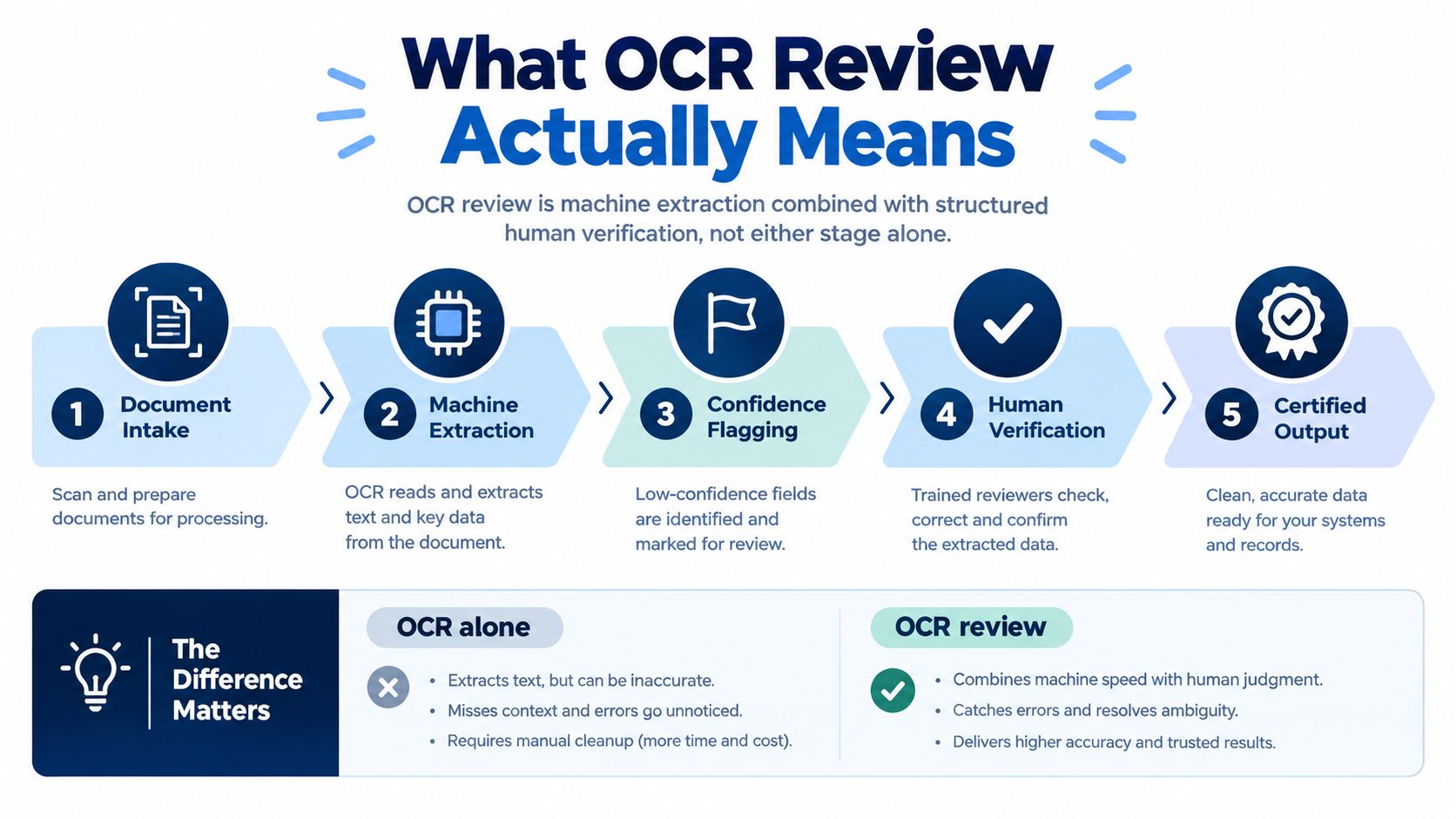
Practical rule: OCR alone produces a transcription candidate. OCR review produces a checked document record.
What the review actually certifies
Review doesn't certify that a machine is infallible. It certifies that a trained human compared the relevant output with the source, resolved the flagged discrepancies, and approved the resulting artefact under a defined procedure. That difference should appear in the audit record, alongside the source image reference, review status, and any escalation.
Teams building a similar process should also distinguish text accuracy from document usability. A field can contain the right characters but still be attached to the wrong label, placed in the wrong reading order, or translated without preserving an important distinction. Evaluation frameworks therefore use measures such as precision, recall, word error rate, and schema-based accuracy, as described in this enterprise OCR benchmark overview.
For a customer-facing explanation of the final translation stage, the certified translation process should make clear where automation ends and human attestation begins.
How Licence Formats Get Read
“Read the licence” sounds like one task. In production, it means handling multiple document families, scripts, layouts, field labels, date conventions, and machine-readable zones.
| Licence Format Family | Key Fields | Common OCR Challenge | Reviewer Decision |
|---|---|---|---|
| Latin-script EU cards with MRZ zones | Name, dates, document number, categories, MRZ | Small characters, dense layout, MRZ misreads | Compare visible fields with MRZ structure and resolve date or character conflicts |
| North American state-issued cards | Name, address, date fields, number, restrictions | Variable field placement and template differences | Identify the issuing template before approving field locations |
| Cyrillic and Greek licences | Name, dates, number, categories | Similar-looking characters and transliteration choices | Preserve the source reading and apply consistent transliteration |
| Arabic and Hebrew right-to-left cards | Name, address, dates, categories, number | Reading-order assumptions and mixed directionality | Confirm field order, script direction, and Latin or numeric blocks separately |
| East Asian licences with ideographs and romanised fields | Native name, romanised name, dates, number, categories | Mixed scripts and compact field grouping | Reconcile native and romanised fields instead of treating either as a duplicate |
| Older or worn laminated cards | Printed fields, security elements, barcodes | Glare, faded ink, skew, and micro-print loss | Use image evidence, neighbouring fields, and machine-readable data together |
Format awareness changes the review question
On a Latin-script card, a reviewer may focus on whether the date format matches the issuing system and whether an MRZ value agrees with the printed number. On an Arabic or Hebrew card, the first concern may be whether the engine has reversed the reading order without indication. On an East Asian licence, the reviewer may need to reconcile a native-script name with a separate romanised field rather than choose whichever version looks more familiar.
The same applies to categories and restrictions. A category such as A, B, or BE isn't decorative text. It can affect how the receiving party understands what the holder may drive. The reviewer checks the printed category, its position, and its relationship to the other licence fields.
Why a generic checklist fails
A generic “name, date, number” check misses the decisions created by format variation. The reviewer needs to know which fields are expected, which scripts appear, how the issuing authority formats dates, and whether a barcode or MRZ provides an independent comparison.
That's the purpose of a format-aware OCR workflow. It doesn't force every licence into the same template. It first identifies the document family, then applies the checks appropriate to that family. An integration that needs structured extraction can examine the driving licence OCR API workflow to see why field localisation and review status need to travel with the extracted values.
The 5-Point Human Checklist
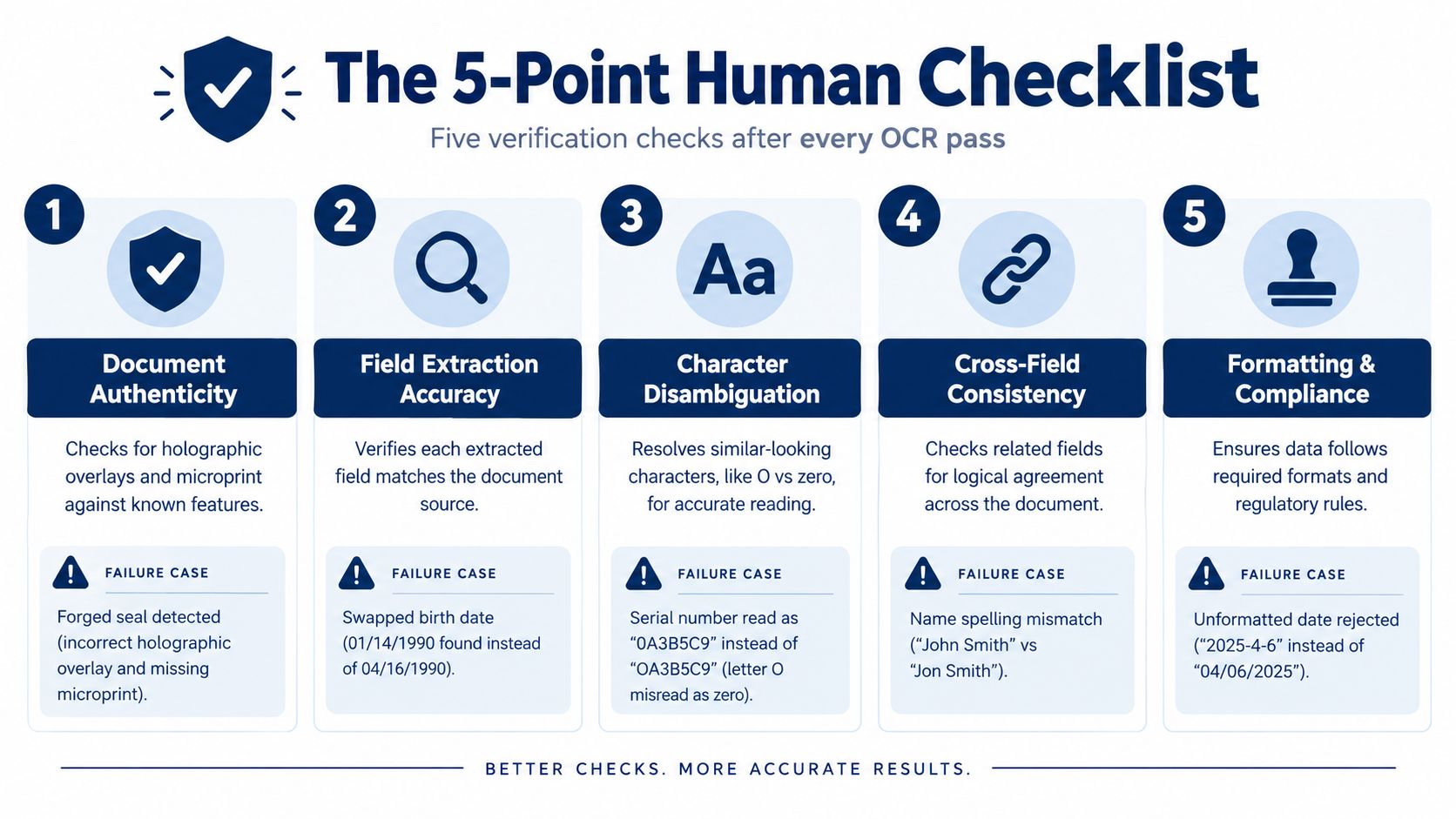
The human gate should be short enough to run consistently and strict enough to stop a plausible error. Each check below is a pass or fail decision. A single failure sends the file to a senior reviewer before certification.
1. Document authenticity
The reviewer examines the licence artwork, holographic overlays, microprint, card proportions, and template alignment against the issuing authority's current design. OCR can't establish authenticity from text alone. A forged card may contain perfectly readable characters while the seal, security pattern, or field placement is wrong.
A practical failure case is a document with a convincing name and number but a holographic overlay that doesn't align with the printed portrait area. The reviewer records the discrepancy instead of allowing a clean OCR result to create false confidence.
2. Field extraction accuracy
The reviewer compares the machine-read name, date of birth, document number, expiry date, and issuing country with the visible printed text. Look-alike substitutions surface here, such as 0 versus O or 1 versus l in a serial number.
The comparison must happen against the image, not against a corrected version generated by the system. If the machine changes a birth date because another date format seems more familiar, the printed source remains authoritative.
3. Address and transliteration
Addresses and names become difficult when native and Latin scripts appear together. The reviewer checks whether the system has dropped a line, merged two fields, or produced a transliteration that doesn't correspond to the source.
For example, a licence may show a native-script surname beside a romanised form. The reviewer confirms that the translation preserves the identity relationship between both fields rather than replacing one with an inferred spelling.
4. Licence categories and restrictions
The reviewer checks the category codes, including combinations such as A, B, and BE, against the visible card and the customer's stated driving context. The aim isn't to infer legal eligibility. It is to ensure that the translation reproduces exactly what the licence displays.
A category that has been omitted, added, or attached to the wrong restriction can make an otherwise accurate translation misleading. That field therefore receives its own gate rather than being treated as ordinary text.
5. Barcode and QR consistency
The final check compares the QR or PDF417 payload with the printed fields. If the barcode says one document number while the visible card shows another, the file is escalated.
This cross-check closes a gap left by visual OCR. A QR or PDF417 code isn't automatically proof that a document is genuine, but it can reveal a mismatch between machine-readable data and the printed surface. The reviewer documents the result and sends any conflict to senior review.
A reviewer shouldn't approve a document because every field has text. Approval requires agreement between the source image, the extracted structure, and the available machine-readable evidence.
Error Rates and Where Review Catches the Rest
OCR performance changes sharply with the source document. TDWI reports that most OCR software delivers about 98% to 99% page-level accuracy, which corresponds to roughly 980 to 990 correct characters in a 1,000-character page. The same discussion describes accuracy falling to about 50% on a difficult page, showing why a headline benchmark can't predict the result for a worn or badly captured licence. These figures are discussed in TDWI's analysis of OCR accuracy.
A licence workflow should therefore route work by confidence and risk, not by a single average score.
| Document Condition | Field-Level Accuracy | Confidence Threshold | Human Action |
|---|---|---|---|
| Clean printed text | Can reach below 1% error in current benchmarks, according to the cited guidance | Review high-risk fields and exceptions | Approve after targeted verification |
| Handwriting | Often remains in the 3% to 5% error range | Route uncertain spans and all critical handwritten fields | Full human comparison |
| Financial or identity-document fields | Some systems target 99.9% field-level accuracy | Treat the target as a control objective, not proof of correctness | Validate against source and barcode data |
| Degraded scans and difficult pages | Can fall to about 50% page-level accuracy in the cited example | Escalate low-confidence pages and affected fields | Re-capture or conduct senior review |
Confidence directs attention
The point of confidence scoring isn't to declare a field correct. It tells the workflow where the machine is uncertain and where a person can reduce risk efficiently. A low score on a document number deserves more attention than a low score on an irrelevant background mark.
A 2026 document-extraction study reported that confidence-gated review captured 2.43 times as many errors as random review at the same 30% review budget, as described in this analysis of selective OCR review. The operational lesson is straightforward: send uncertain regions, handwriting, degraded scans, tables, and multilingual blocks to people instead of rereading every high-confidence character.
Accuracy needs a definition
Teams also need to decide what “accurate” means. Word error rate measures text differences, but a field-level system may care more about whether the expiry date, name, or document number is correct. A document can have strong character accuracy and still fail if the engine collapses columns, assigns a value to the wrong label, or inserts text that isn't present.
That's why the review queue should expose page-level and field-level results separately. It gives managers a way to see whether failures come from image quality, recognition, layout, language, or downstream interpretation.
What Customers and API Partners Receive
The final output should be understandable to a traveller and useful to an integration team. Those audiences need different interfaces, but they should rely on the same underlying review record.
The customer-facing pack
The customer receives a certified PDF translation with a unique verification ID, a tamper-evident signature page, and a QR code leading to a public verification page. That page can re-display the holder's name, document number, and issuing authority so a customer, rental agent, or border officer can compare the translation with the document record.
The QR code doesn't replace the original licence or determine local acceptance. It gives the receiving party a quick way to check that the digital translation corresponds to the recorded document information. The QR authentication workflow explains why verification should remain tied to the issued artefact rather than to an untracked downloaded file.
The partner-facing response
An API partner needs more than a PDF. A useful structured response includes:
- Field values: Extracted name, dates, number, issuing authority, categories, and other supported fields.
- Confidence scores: A score for each field, so the partner can decide whether to display, hold, or escalate it.
- Review status: A clear state such as auto-approved, human-verified, or escalated.
- Source integrity record: A SHA-256 hash of the source image for audit comparison.
- Pipeline events: Webhooks for intake, extraction, review, certification, and delivery.
This separation helps partners build sensible product behaviour. A low-confidence result shouldn't look identical to a human-verified result in a rental or travel application.
Service expectations need definition
The same workflow can expose service commitments, such as 95% of standard-review submissions returned within 15 minutes, 99% within 2 hours, and a 24-hour fix-or-refund window for a field proven incorrect, as specified in the supplied service information. These are operational promises, not accuracy statistics, so the customer terms should explain what counts as standard review, what evidence supports a correction, and which acceptance decisions remain local to the receiving authority.
A QR-backed document closes the loop only when the portal, PDF, review record, and source data remain connected. If one of those layers changes without updating the others, verification becomes another source of confusion.
Failure Modes Review Is Built to Catch
The most dangerous OCR errors are often plausible. A random symbol is easy to reject. A correct-looking surname with one substituted character may pass unnoticed unless the reviewer compares it with the image and neighbouring fields.
| Failure Mode | Typical Trigger | Review Detection Cue |
|---|---|---|
| O and 0 substitution | Serial numbers, names, or dates with similar glyphs | Compare the character shape and check related barcode data |
| I, 1, and l confusion | Small fonts and dense number blocks | Inspect the source at higher zoom and compare field conventions |
| S and 5 substitution | Worn print, glare, or low contrast | Check adjacent fields and machine-readable values |
| Skew and perspective distortion | Angled phone capture or cropped card | Reassess field boundaries and baseline alignment |
| Right-to-left reversal | Arabic or Hebrew text mixed with Latin fields | Confirm reading direction and field order |
| Hallucinated text | Model completion from context rather than pixels | Look for characters absent from the image and demand source evidence |
| Micro-print loss | Security overlays, glare, or faded laminate | Compare the security area and escalate if evidence is incomplete |
| Column or field collapse | Compact layouts and multiple text regions | Reconstruct label-value relationships before approval |
Why a threshold isn't enough
A confidence score can identify uncertainty, but it can't understand every contradiction. A model may assign high confidence to a misread character because the visual pattern resembles a familiar token. It may also produce a complete-looking field where the image contains only partial evidence.
Reviewers therefore cross-reference neighbouring fields, expiry consistency, MRZ checksums, and QR payloads where available. They look for relationships, not just isolated strings. A date that conflicts with the document's visible format or a number that disagrees with the barcode deserves escalation even if the OCR score appears strong.
The broader risk is interpretation. Guidance on OCR technology limitations and review risks highlights failures involving glare, skew, complex layouts, multilingual content, and look-alike characters. Survey work also warns that evaluation often overfocuses on modern Western documents while missing structural problems in more diverse identity and travel records, as discussed in this survey of OCR evaluation across documents and languages.
Troubleshooting a Review Result
Start with the original image, not the translated PDF. Open the result in the dashboard, select the questionable field, and compare it with the printed licence at high zoom. If the source is clear and the value is wrong, record the field and request a re-review using the document's request ID.
If the image is blurred, cropped, reflective, or too small to read, upload a better scan or photograph. A cleaner source can resolve the issue faster than repeated processing of the same pixels. Keep the original file available because the reviewer may need it to distinguish a recognition error from an unreadable source.
Use self-service correction when one field is clearly affected and the dashboard provides a correction route. Escalate to API support when the review status is inconsistent, a webhook is missing, the QR page doesn't reflect the issued PDF, or the request ID cannot be found. An approved amendment should update the certified PDF and its QR-backed verification record within the stated correction process.
World Driving Permit combines OCR for more than 50 licence formats with a 5-point human review before issuing certified translations in 28 languages. If your travel workflow needs a reviewed translation with QR-backed verification, explore World Driving Permit and submit the licence through its digital process.